I paid, but Settings still said Go Premium: the screen after the paywall
After buying Lockboxy Premium, the app still showed the paywall. How I built the paying customer's view: a membership read, honest status lines, tests.

On this page
The bug report came from me. I bought Premium in my own app, Lockboxy, went back to Settings, and the card at the top still said Go Premium. I tapped it, and the same sales page I had just paid on opened again: plan cards, trial timeline, purchase button.
Nothing was wrong with billing. The entitlement was active, the Premium features were unlocked, RevenueCat had the purchase. The app just had no screen for a person who had already said yes. To someone who had just paid, it looked like it still wanted their money, and that is exactly the moment a confused customer asks for a refund.
I wrote a short version of this fix at the end of RevenueCat paywall patterns. This post is the long version: why the bug existed, the line I drew between gating and describing, the rules for what the app is allowed to promise, and the tests that keep the "after" state from disappearing again. It shipped in Lockboxy 1.2.12 (45) on 2026-10-01: one commit, 24 files, 831 lines added.
The state was there. Nobody rendered it.
PremiumScreen already tracked whether the user was Premium. It subscribed to RevenueCat's customer-info listener and kept isPremiumNow up to date:
useEffect(() => billingPort.onEntitlementChange(setIsPremiumNow), []);But that value only went to two places: analytics, and the exit offer (so a paying customer would not get a discount sheet on the way out). It never decided what the screen showed. The Settings card was worse: it always rendered the teaser strings, premiumTeaserTitle and premiumTeaserBody, whatever the entitlement said.
This is an easy bug to write because every test of the paywall was a test of selling. Does the yearly plan come pre-selected? Does the trial timeline use the real intro period? Does the exit offer show once? Nobody, me included, had rendered the paywall with a Premium user and asked what they should see.
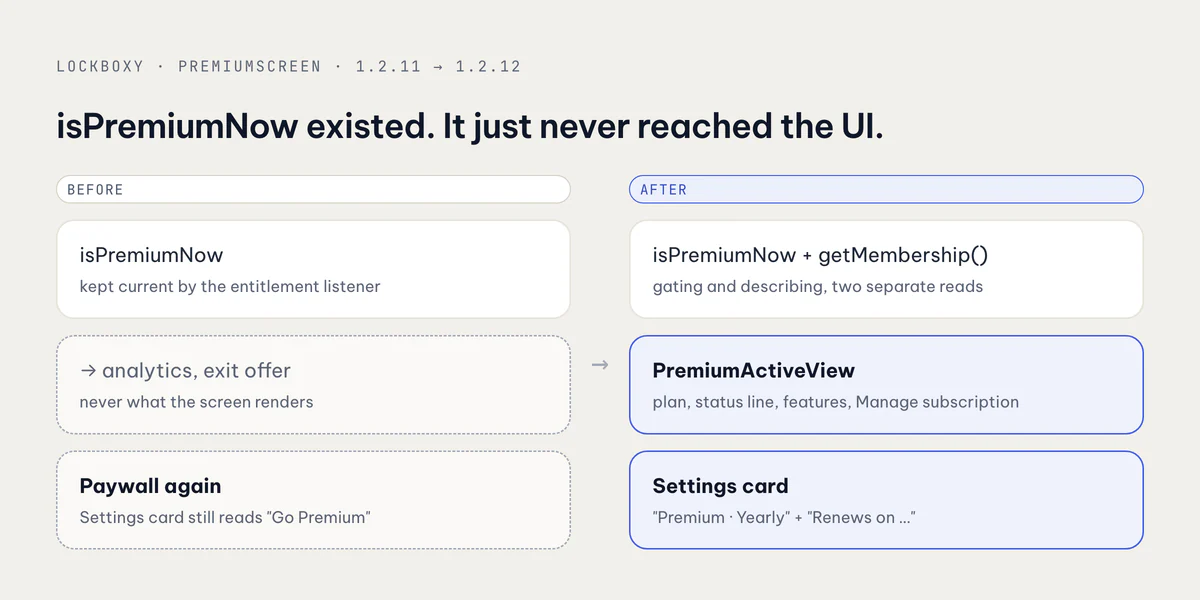
Gating and describing are two different reads
The fix starts with a rule: isPremium() gates, getMembership() describes. They answer different questions, and they fail differently.
isPremium() is synchronous and must be right, because every locked feature asks it. getMembership() is async and only feeds text. If it fails, the customer should see a slightly vaguer sentence, never lose access. So I added it to the billing port as a separate method that never rejects:
export interface BillingMembership {
  /** null when the store reports a product this app does not know (an old SKU, a promo grant). */
  readonly productId: BillingProductId | null;
  /** When access ends or renews; null for a lifetime purchase. */
  readonly expiresAtMs: number | null;
  /** false once auto-renew is off (or for lifetime, which never renews). */
  readonly willRenew: boolean;
  /** In the store's introductory free trial. */
  readonly isTrial: boolean;
}

/** The active Premium membership, or null when not Premium. Never rejects. */
getMembership(): Promise<BillingMembership | null>;
The RevenueCat adapter fills it from getCustomerInfo() and the active premium entitlement: productIdentifier, expirationDate, willRenew, and periodType === 'TRIAL'. Two details matter:
- The product ID goes through the same mapping the paywall uses, because Google Play reports a subscription as
subscriptionId:basePlanId. An ID the app does not recognise becomesnull, not a guess. Date.parseon the expiry is checked withNumber.isFinite. A bad date becomesnull, notNaNshowing up later as "Invalid Date" on screen.
Any exception returns null too. The comment on the type says it plainly: this is "for showing a paying customer what they have, never for gating".
The app only says what it knows
The wording lives in a pure function, membershipStatus(), so every branch can be tested without rendering anything. It picks one key under vault.premium.membership.status:
export function membershipStatus(m: BillingMembership | null): MembershipStatus {
  if (!m) return { key: 'active' };
  if (m.productId === 'lifetime' || m.expiresAtMs === null) {
    // A subscription the store reports without an end date is still not
    // lifetime; say only that it is active rather than promise "forever".
    return m.productId === 'lifetime' ? { key: 'lifetime' } : { key: 'active' };
  }
  const dateMs = m.expiresAtMs;
  if (m.isTrial) return { key: m.willRenew ? 'trialRenews' : 'trialEnds', dateMs };
  return { key: m.willRenew ? 'renews' : 'ends', dateMs };
}
The rules behind it:
- Lifetime only when the product is lifetime. A subscription with a missing end date is not "yours for good". It is just "Active".
- No date, no date promise. If the expiry is unknown, the app does not invent a renewal date.
- Unknown product, plain name. The plan title becomes just "Premium" instead of guessing Monthly or Yearly.
- Trials say which way they are going. "Free trial · becomes yearly on …" and "Free trial · ends on …" are different promises. A customer who turned off auto-renew during the trial should see the second one.
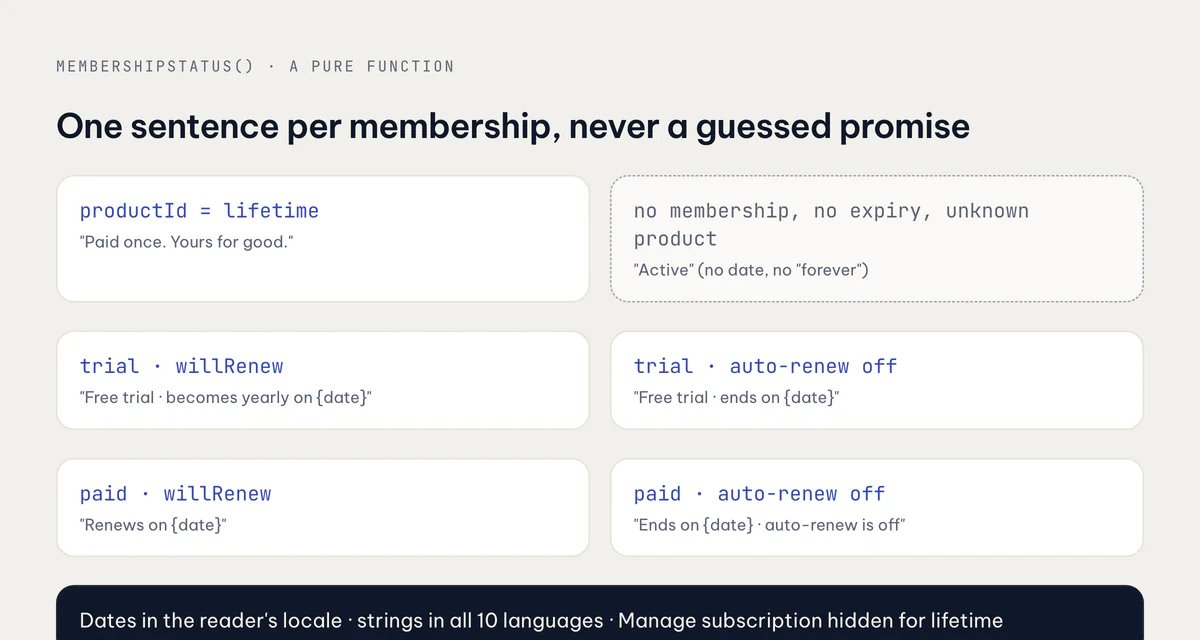
The date is formatted in the reader's own locale with toLocaleDateString(locale, { day: 'numeric', month: 'long', year: 'numeric' }), so a Korean user and a German user each see their own date order.
Two screens that switch on live state
The Premium screen now has an early return. A Premium customer gets PremiumActiveView: a "You're on Premium" heading, a card with the plan and the status line, every feature their plan includes, and a Manage subscription button.
// A paying customer gets their plan, not the sales page; the exit sheet
// still renders below so a just-redeemed offer code can close it.
if (isPremiumNow && !exitSheetVisible) {
  return <PremiumActiveView membership={membership} colors={colors} />;
}
The !exitSheetVisible part is there for one flow. Lockboxy's exit offer can hand out an offer code. When the code is redeemed, Premium turns on while the sheet is still open, and the sheet needs to finish closing itself before the screen switches.
Manage subscription opens Apple's own page, https://apps.apple.com/account/subscriptions (or Google Play's equivalent on Android). Cancelling, upgrading and switching plans are the store's job, and the store's page is always right. The button is hidden for lifetime, because there is nothing to manage.
Settings keeps the same card, so the layout does not jump, but swaps its text once Premium: the plan name as the title and the status line underneath. It still opens the Premium screen, which now shows the membership view.
Both screens follow the entitlement listener. A small hook, useMembershipDetails(isPremium), refetches the membership each time Premium turns on and drops it when Premium turns off, with a cancelled flag so a slow response from a previous state cannot overwrite a newer one. A purchase, a restore, a redeemed code or an expiry all switch the UI without leaving the screen.
Ten locales, written for each one
Lockboxy ships in ten languages: English, German, Spanish, French, Italian, Japanese, Korean, Brazilian Portuguese, Vietnamese and Simplified Chinese. The new strings went into all ten common.json files in the same commit, 19 lines each. The English set:
"status": {
  "lifetime": "Paid once. Yours for good.",
  "trialRenews": "Free trial · becomes yearly on {{date}}",
  "trialEnds": "Free trial · ends on {{date}}",
  "renews": "Renews on {{date}}",
  "ends": "Ends on {{date}} · auto-renew is off",
  "active": "Active"
}
In Vietnamese, "Ends on … · auto-renew is off" is "Hết hạn ngày … · đã tắt tự gia hạn". A sentence that tells someone their access is ending has to be exactly right in every language. A wrong translation here creates a support email, not just an awkward screen.
Tests for the after state
The suite now has an explicit "a paying customer" block. The test names read like the bug report turned inside out:
a paying customer
  ✓ sees their plan, its renewal date and a way to manage it — not the sales page
  ✓ a trial that was cancelled says when it ends
  ✓ lifetime has nothing to manage in the App Store
  ✓ a purchase turns the paywall into the membership view at once
Settings
  ✓ a Premium user sees their plan and when it renews, not "Go Premium"
  ✓ a lifetime purchase says so instead of a renewal date
The first one also checks a negative: the yearly plan card must not be on screen. The purchase test starts on the real paywall, presses the yearly plan and the purchase button, and expects the membership view to appear without a remount. The pure wording logic has its own tests, including "unknown details fall back to a plain 'active', never a guessed promise".
The fake billing port used across the app's tests got getMembership() too, returning null when the fake user is not Premium and a yearly plan when they are. The hook calls it as billingPort.getMembership?.() and swallows a rejection, so an older test with a partial mock cannot crash a screen that never cared about membership.
Takeaways
- A paywall needs an "after" state. If a paying customer opens it, what do they see? Write that screen before you ship the paywall.
- Keep gating (
isPremium(), synchronous, must be right) separate from describing (getMembership(), async, may be vague). A failed description should never cost access. - Read plan, expiry, auto-renew and trial from the active entitlement, and map unknown values to
nullinstead of guesses. - Put the wording in a pure function, and let the fallback always be the most modest sentence: "Active", not "forever".
- Send "Manage subscription" to the store's own page, and hide it for lifetime.
- Translate the status lines in every locale you ship, and test the paying customer's screen as carefully as the selling one.
Lockboxy is at lockboxy.io.vn, and the rest of my apps are on apps.vanthuongdao.id.vn.
Related posts