Why RevenueCat said 143 customers when 17 people downloaded
RevenueCat counts app user IDs, not people, and gross revenue, not proceeds. Reading Lockboxy's numbers honestly, and moving debug builds to the Test Store.

On this page
This week I opened two dashboards for Lockboxy, my private vault app, one after the other.
RevenueCat, for the last 28 days: 143 active customers, 136 new customers, $4.15 in revenue, 2 active subscriptions.
App Store Connect, for the 90 days to September 30: 17 first-time downloads, 4 redownloads, 38 updates, $2 in proceeds, 2 in-app purchases.
A shorter window with eight times more "customers" than a longer window has downloads. And revenue that's twice the money that will actually reach my bank. Neither dashboard is wrong. They count different things, and for a small indie app the difference is big enough to mislead you about whether the app is growing. This post is what those numbers really mean, and the one-line code change that stops my own testing from inflating them.
What a RevenueCat "customer" is
RevenueCat doesn't know about people. It knows about app user IDs. When your app calls Purchases.configure() without passing an ID, which is what you do in an app with no accounts, the SDK generates an anonymous ID like $RCAnonymousID:… and stores it on the device. That ID is the customer.
Lockboxy has no login. It's an offline vault, and that's the point of it. So every one of its customers is anonymous, and the rules for anonymous IDs decide the count:
- Every install creates a new customer. Delete the app and install it again, and the old ID is gone with the app's storage. The SDK makes a fresh one.
- An update from a version without the SDK creates a new customer on the first launch of the new version, because there was never an ID before.
- Every build that runs with the production key counts. That includes the simulator, TestFlight, and the devices App Review uses.
"New customers" is the number of IDs RevenueCat saw for the first time in the period. "Active customers" is the number of IDs that talked to RevenueCat in the period, new or not. Neither is "people who downloaded the app".
Where 143 came from
Line the two dashboards up and the gap has several sources. I can't split the 143 exactly, since anonymous IDs carry no label saying where they came from, but each source is real:
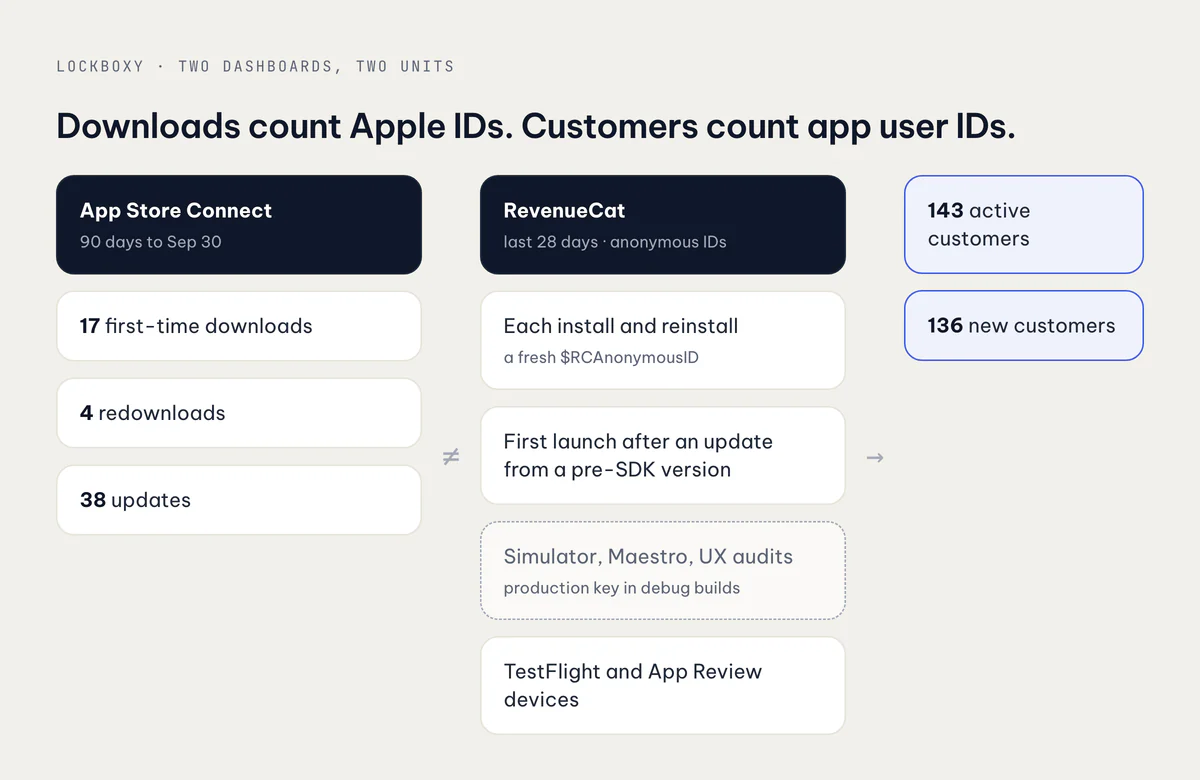
- Real installs. 17 first-time downloads and 4 redownloads are 21 installs, so at least 21 IDs. A redownload is the same person, but a new customer.
- Updates. 38 updates in App Store Connect. Anyone who updated from a version that predates the RevenueCat SDK became a new customer on their first launch afterward. Anyone who updated from a version that had it showed up as active, not new.
- My own testing. This is the source I could fix, and it adds up fast. Every debug build on the simulator configured RevenueCat with the production App Store key. So did every Maestro flow and every UX audit run. Each fresh simulator, each reinstall, each wiped test device was a new production customer.
- TestFlight and App Review. These builds use the production key too, because they're the build that ships. Each tester install and each review device adds an ID.
Notice also that the windows don't match. RevenueCat's 143 covers 28 days, and App Store Connect's 21 installs cover 90. The real gap is even wider than the headline.
Revenue is not proceeds
The money numbers disagree too, by a factor of two: $4.15 against $2. The purchase counts, on the other hand, agree. RevenueCat has 2 active subscriptions and App Store Connect has 2 in-app purchases. So nobody is missing a sale. The difference is which number each dashboard calls "money".
RevenueCat's default revenue figure is gross: what customers paid, converted to dollars, before Apple takes anything. App Store Connect's proceeds are what Apple will pay you after two deductions:
- Apple's commission, 30% by default, or 15% under the Small Business Program (more below).
- Taxes. In many storefronts the price a customer sees includes VAT or a similar tax, and Apple removes it before computing your share.
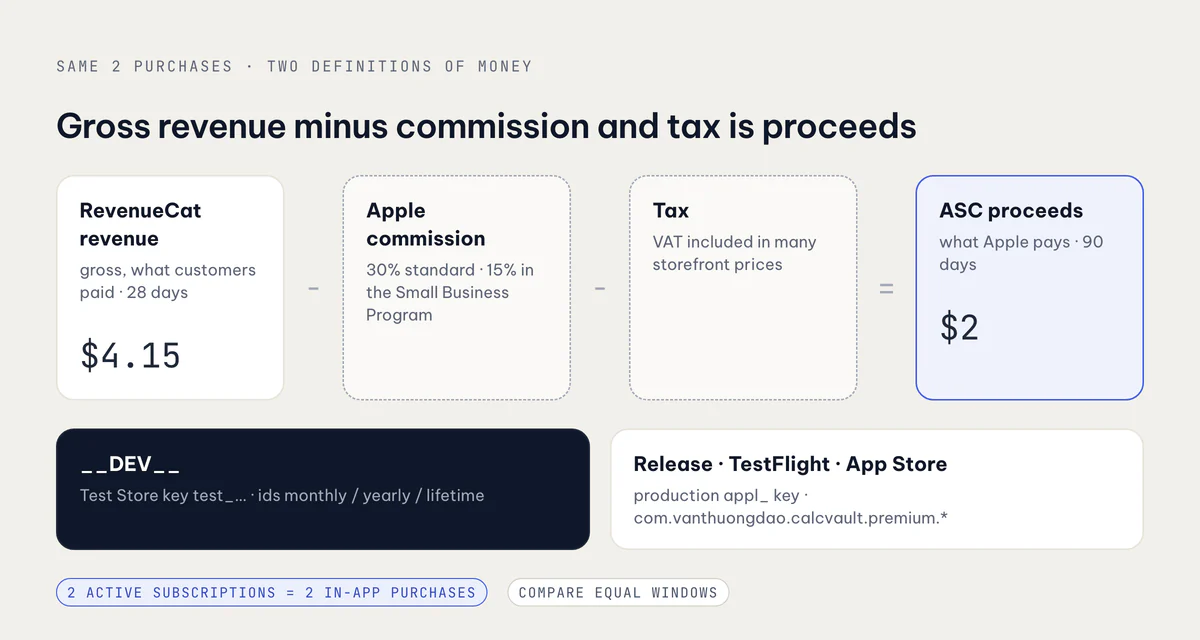
On a $4.15 day, two dollars is a rounding error. On a real month it's the difference between a business plan and a hobby. If you're reading RevenueCat to decide whether an app pays for itself, mentally cut the revenue roughly in half for a small app on the standard rate, then check the payments report in App Store Connect, which is the number that actually arrives.
The fix: debug builds talk to the Test Store
I can't stop TestFlight or App Review from using the production key, because they have to test the real build. But the simulator and automated flows don't need the production project at all. RevenueCat has a Test Store: a store per project with its own public key (prefixed test_), its own products, no StoreKit involved, and purchases that complete in-app without an Apple ID.
So Lockboxy's billing config now picks the key by build type:
/** `true` in debug builds only: billing talks to RevenueCat's Test Store. */
export const USE_REVENUECAT_TEST_STORE: boolean = __DEV__;

export const REVENUECAT_API_KEY: string = USE_REVENUECAT_TEST_STORE
  ? REVENUECAT_TEST_STORE_API_KEY // 'test_…', both platforms
  : Platform.OS === 'android'
    ? REVENUECAT_API_KEY_BY_PLATFORM.android // 'goog_…'
    : REVENUECAT_API_KEY_BY_PLATFORM.ios; // 'appl_…'
The part that's easy to miss is the product IDs. The App Store products are com.vanthuongdao.calcvault.premium.monthly and so on, while the Test Store's products are just monthly, yearly and lifetime. Every lookup in the app, from paywall packages to intro-offer eligibility to "which plan is active", keys on product IDs. So the ID map switches with the key:
export const REVENUECAT_TEST_STORE_PRODUCT_IDS = {
  monthly: 'monthly',
  yearly: 'yearly',
  lifetime: 'lifetime',
} as const;

export const REVENUECAT_PRODUCT_IDS = USE_REVENUECAT_TEST_STORE
  ? REVENUECAT_TEST_STORE_PRODUCT_IDS
  : Platform.OS === 'android'
    ? REVENUECAT_PRODUCT_IDS_BY_PLATFORM.android
    : REVENUECAT_PRODUCT_IDS_BY_PLATFORM.ios;
The Test Store products sit in the same default offering packages and grant the same premium entitlement, so nothing above the config file knows which store it's talking to. The existing guard that checks a key's prefix (appl_ on iOS, goog_ on Android, which catches the wrong store's key in a build) now accepts test_ in debug.
Three details came out of testing:
- Release builds are unchanged. TestFlight and the App Store take exactly the old key and product-ID path. A unit test asserts the Test Store key never appears in a release configuration.
- The Test Store has no promotional offers or offer codes. Lockboxy's exit offer has a promotional-offer variant, as described in RevenueCat paywall patterns. In debug it simply resolves to "no offer", which the code already handled.
- Real StoreKit sandbox purchases now need a Release or TestFlight build. I wrote that at the top of the sandbox runbook, because the next time I try to test a sandbox purchase in the simulator, I'll have forgotten.
This went out today in Lockboxy 1.2.13 (47) to TestFlight. From now on, the production project only sees real installs, TestFlight and review.
The other half of the fix is a form
The commission line deserves its own action. Apple's App Store Small Business Program cuts the commission from 30% to 15% for developers whose proceeds across all their apps stay under $1 million a year. For an indie developer that's the whole account.
It isn't automatic. You enroll from the developer website, declaring any associated developer accounts, and the reduced rate applies after Apple accepts you, not retroactively. If you sell anything in your apps and haven't done this, it's the highest-return ten minutes in this post.
How I read the dashboards now
- Count sales, not customers. Active subscriptions, trials and transactions mean the same thing in RevenueCat and App Store Connect. Customer counts don't, especially in an app without accounts.
- Compare equal windows. Set both dashboards to the same date range before comparing anything.
- Treat "new customers" as installs plus noise. For an anonymous app, it tracks installs, reinstalls and builds, not people.
- Read proceeds for money. RevenueCat's revenue is for trends. App Store Connect's proceeds and payments are what you can spend.
If you're setting up purchases for the first time, the first-IAP trap in App Store Connect is worth reading before you submit.
Checklist
- Know that a RevenueCat customer is an app user ID. Without logins, every install, reinstall and test build makes a new one.
- Expect updates from pre-SDK versions to show up as new customers.
- Point debug builds (
__DEV__) at the RevenueCat Test Store key, and switch the product-ID map along with the key. - Keep release builds on the production key, and test that the Test Store key can't leak into them.
- Remember the Test Store has no promotional offers or offer codes, and use TestFlight for real sandbox purchases.
- Compare RevenueCat's gross revenue with App Store Connect's proceeds, minus commission and tax, over the same window.
- Enroll in the App Store Small Business Program if you qualify. It's 15% instead of 30%, and it only applies after you're accepted.
Related posts