RevenueCat paywall patterns: trial timeline, exit offer, your plan
Paywall patterns from my React Native apps on RevenueCat: an honest trial timeline, a one-time exit offer, offer codes, and showing buyers their plan.

On this page
All seven of my apps sell through RevenueCat (react-native-purchases). Most sell a subscription; Lockboxy, for example, has monthly, yearly with a free trial, and lifetime. Linkeeper sells one non-consumable unlock and nothing else. Over the last few releases the paywalls in Lockboxy, Minivid, Talkzy and Stampzy ended up with the same shape, so here are the patterns that stuck.
They didn't come from a design phase. In the Lockboxy changelog the reason is spelled out: RevenueCat showed new installs converting at roughly zero. The paywall defaulted to Lifetime, promised a "3-day free trial" to everyone whether the store would honour it or not, and the free-cap sheet read like a wall. This post covers what replaced that, plus a bug on the other side of the purchase that I only fixed this week.
The same skeleton in every app
Each app has a BillingPort interface, and revenueCatBillingAdapter.ts is the only file that imports react-native-purchases. A fake billing port stands in when there's no real key, which is why the simulator, the tests and the App Store screenshot runs can all open the paywall without a StoreKit sandbox.
Gating asks one question, isPremium(), kept current by RevenueCat's customer-info listener through onEntitlementChange. A purchase, a restore, a redeemed offer code or an expiry all flip that one boolean, and every screen that cares re-renders. That listener comes up again in the bug at the end.
A trial timeline that comes from the store
The paywall shows a trial only when the store says this person can actually get it. RevenueCat's checkTrialOrIntroductoryPriceEligibility has to return ELIGIBLE. UNKNOWN counts as no, as RevenueCat recommends. A person who isn't eligible sees no mention of a trial anywhere: not in the plan card, not on the button, not in the footer.
When the trial is shown, it comes as a timeline instead of a line of small print:
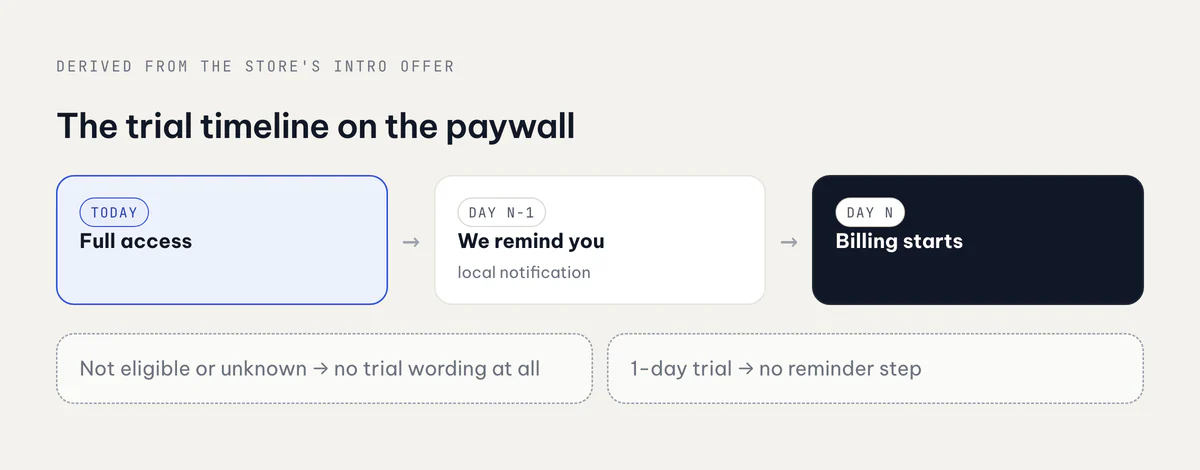
The steps are built from the store's real introductory period, never from a number in the code:
export function deriveTrialTimeline(intro?: BillingIntroOffer) {
  const days = trialLengthDays(intro);          // period × count × cycles, null if not a free trial
  if (days === null) return null;
  const steps: TrialTimelineStep[] = [{ kind: 'today' }];
  if (days >= 2) steps.push({ kind: 'reminder', day: days - 1 });
  steps.push({ kind: 'billing', day: days });
  return steps;
}
That paid off in late September. Lockboxy's yearly trial went from 3 days to 7 in App Store Connect with no code change: the plan subtitle, the footer terms and the timeline all read {{count}} from the intro offer, in all ten languages. To keep it that way, a locale test now fails if any trial or reminder string carries a digit of its own.
The reminder is real, because the timeline promises one. After a trial purchase the app asks for notification permission at the moment the promise was made. Talkzy and Stampzy first show a short primer sheet that explains the single notification. Then one local notification is scheduled for the day before the trial ends, using the expiration date from RevenueCat (periodType === 'TRIAL') and falling back to the intro period. On Lockboxy, every unlock into the vault checks it again and cancels it once auto-renew is off. A one-day trial gets no reminder step, because that reminder would arrive after the charge.
The rest of the paywall follows the same rule of not guessing. Yearly is preselected. Its per-month equivalent comes from the store's own pricePerMonthString, and the saving percentage is computed from real prices and rounded down. Lifetime sits last as the anchor. The fixed footer always states the price, the period and auto-renewal for the selected plan, plus Restore, Terms and Privacy. That footer is what App Review guideline 3.1.2 asks for.
One exit offer, picked by who is closing
The first time someone without Premium closes the paywall, they get one sheet with a discounted first year and a 24-hour countdown. After that it never shows again, whether they dismiss it, accept it or let it expire. The countdown is saved on the device, so if the app is killed while the sheet is up, the next close resumes the same deadline instead of starting a new 24 hours.
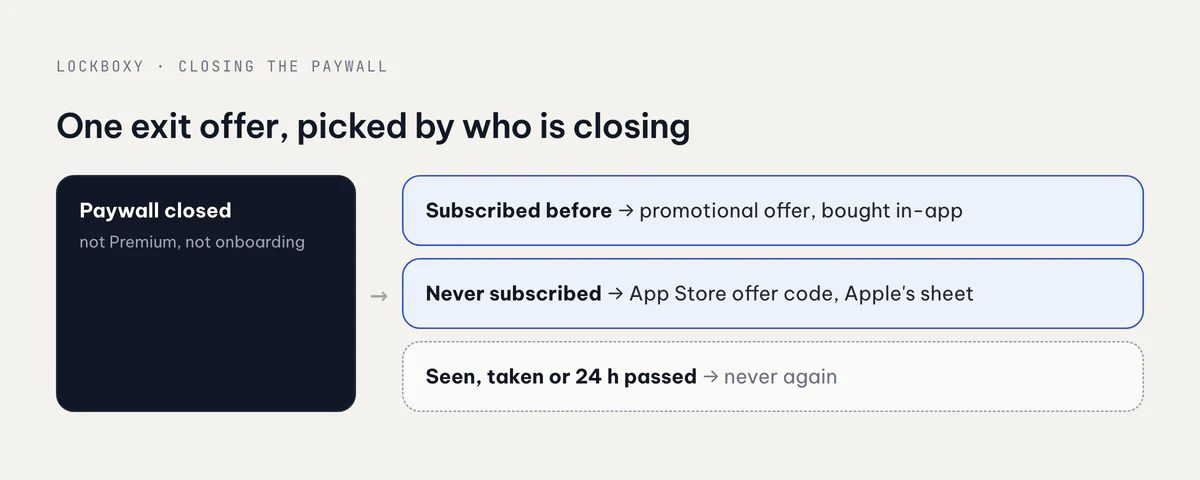
There are two variants because of something I found in the sandbox while building Minivid's version. Apple won't sign a promotional offer for a customer who has never subscribed. RevenueCat passes the refusal back as "The User is ineligible for that action." So:
- A past subscriber gets the promotional offer. It's fetched with
getPromotionalOfferand bought in-app withpurchaseDiscountedPackage, showing the store's own localized discounted price. In practice it's a win-back offer. - A customer who never subscribed gets an App Store offer code. "Redeem offer" copies the code and opens Apple's own sheet with
presentCodeRedemptionSheet(). StoreKit can't price an offer code, so the copy names a percentage and says Apple shows the exact price before you confirm. It never shows an amount the app can't verify.
The adapter checks allPurchasedProductIdentifiers for a past monthly or yearly purchase before it asks for a signature, so a new customer never triggers a request that is certain to fail. If the sheet can't honestly describe the offer as "your first year", it isn't shown at all.
A few guardrails go with it:
- Minivid never shows the exit offer on the onboarding paywall. In the first minute, before the app has been used once, a discount reads as pressure rather than a second chance.
- Stampzy keeps the code variant behind a flag that stays off until the codes exist in App Store Connect.
- Lockboxy holds the offer only on a back action the user asked for. A panic lock or auto-lock reset is never delayed by a sheet.
A redeemed code doesn't come back through the sheet. It arrives later through the customer-info listener, which flips the entitlement, closes the sheet and finishes the close that was interrupted.
The bug: Settings still said "Go Premium"
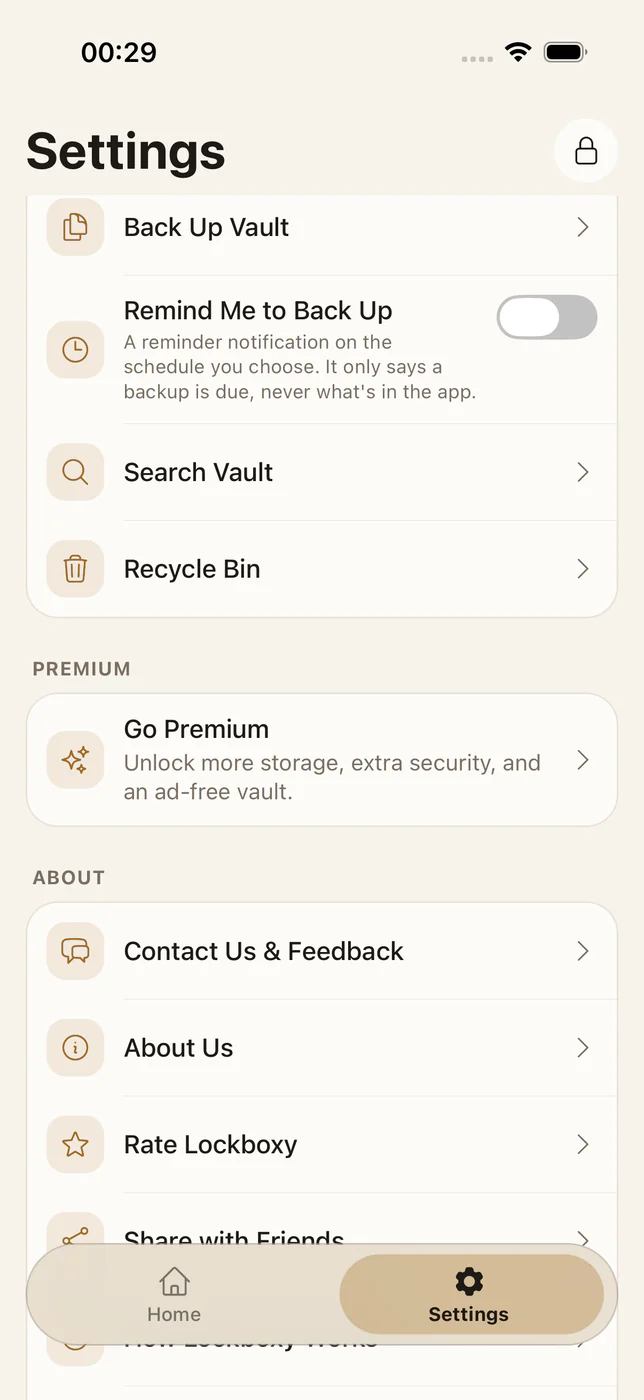
I reported this one myself. After buying Lockboxy Premium, Settings still showed the Go Premium teaser, and tapping it opened the same sales page. Nothing was broken in billing: the entitlement was active and the features were unlocked. But PremiumScreen tracked isPremiumNow and only passed it to analytics and the exit offer, never to what it rendered. To the person who had just paid, the app still looked like it wanted their money.
The fix went into build 1.2.12 (45) on 1 October and has three parts:
- A membership read that is separate from gating.
BillingPort.getMembership()returnsnullwhen the user isn't Premium and never rejects. It reads the product, expiry, auto-renew flag and trial flag from the active entitlement, not from a cached purchase:
const e = info.entitlements.active['premium'];
if (!e) return null;
return {
  productId: toBillingProductIdFromVendorId(e.productIdentifier) ?? null,
  expiresAtMs: e.expirationDate ? Date.parse(e.expirationDate) : null,
  willRenew: e.willRenew,
  isTrial: e.periodType === 'TRIAL',
};- Wording as a pure function.
membershipStatus()picks one sentence: lifetime, "Renews on …", "Ends on … · auto-renew is off", or the trial versions of those two. An unknown product or a missing date gets only "Active". The app never guesses a promise like "forever" or a renewal date it can't see. - Two screens that switch on the live state. The Premium screen renders
PremiumActiveViewfor a customer: the plan, the status line, everything unlocked, and "Manage subscription", which opens the store's page and is hidden for lifetime because there's nothing to manage. The Settings card shows the plan and its status instead of the teaser. Both follow the entitlement listener, so a purchase or restore switches them at once, with no remount.
Linkeeper already had a version of this: once the unlock is bought, its Settings section switches from the unlock row to one saying Linkeeper Unlimited is yours. The lesson for the subscription apps was the same. A paywall needs an "after" state, and the test suite should render it.
Takeaways
- Read trial eligibility from the store, treat "unknown" as no, and build the timeline from the real intro period.
- If the paywall promises a reminder, schedule it, and cancel it when auto-renew is turned off.
- Promotional offers are for past subscribers. New customers need an offer code. Check purchase history before you ask for a signature.
- Show an exit offer once, never on onboarding, and never quote a price the app can't verify.
- Design the screen a paying customer sees. Gating on
isPremiumisn't enough if the UI still looks like a sales page.
How ads fit into the free tier of the same apps is in AdMob in a React Native app. All seven apps are on apps.vanthuongdao.id.vn.
Related posts