Google Search Console for eight domains: properties, TXT records, sitemaps
Search Console for seven app domains and a personal one: domain vs URL-prefix properties, a Mắt Bão TXT trap, sitemap timing, when to request indexing.


On this page
On 2026-10-01 five of my app landings moved to their own .io.vn domains in one afternoon, and by the evening all seven apps had one. I wrote about choosing those domains and pointing them at Vercel in Choosing domains for indie apps. This post is the part that came straight after: getting all of them into Google Search Console.
Eight domains in total: lockboxy.io.vn, linkeeper.io.vn, minivid.io.vn, ringsy.io.vn, talkzy.io.vn, baton.io.vn, stampzy.io.vn, and my personal vanthuongdao.id.vn, which hosts the portfolio on www., this blog under /blog and /vi/blog, and the app showcase on apps.. All eight now sit in one Google account as domain properties, each with its sitemap submitted. On the way I deleted a verification record by accident, and I learned which steps are worth doing by hand and which are not.
Domain property or URL-prefix property
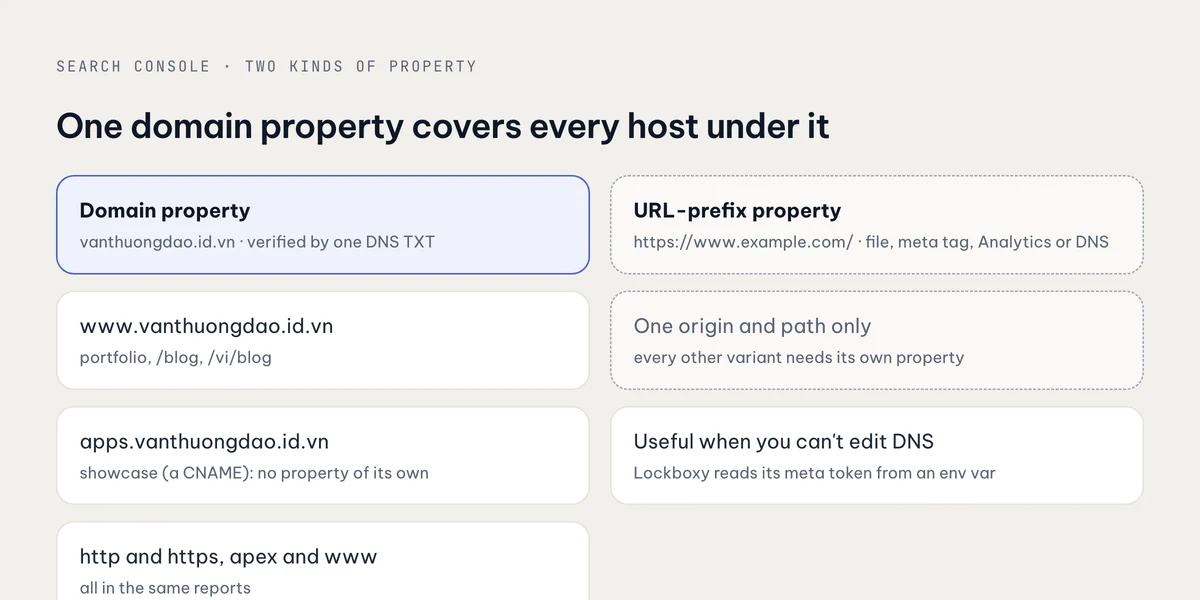
Search Console has two kinds of property, and the choice decides how much of the site you see.
| Domain property | URL-prefix property | |
|---|---|---|
| Covers | every subdomain, http and https | exactly one origin and path, e.g. https://www.example.com/ |
| Verification | DNS TXT record only | HTML file, meta tag, Analytics, Tag Manager, or DNS |
| Good for | a domain whose DNS you control | a host where you cannot touch DNS |
For my sites the domain property is the obvious choice. Every landing redirects / to a locale, has a www next to the apex, and is reachable over both http and https. A URL-prefix property sees only one of those variants, and I would be adding properties for the rest.
The personal domain shows the biggest benefit. One domain property for vanthuongdao.id.vn covers www.vanthuongdao.id.vn (portfolio and blog) and apps.vanthuongdao.id.vn (the showcase). The showcase is a CNAME on that domain, so it needs no property and no verification of its own. Its pages and its sitemap simply show up under the parent.
URL-prefix still has a place. The Lockboxy landing reads a Google verification token from an environment variable for a meta-tag property, as described in SEO and GEO for app landing pages. It is a useful fallback, but with DNS access I go to the domain property every time.
Verifying at Mắt Bão, and the TXT record I deleted
Verification is one record. Search Console gives you a value like google-site-verification=…, and you add it as a TXT record on the root of the domain (@). Wait a few minutes, press Verify. For the .io.vn domains that was routine: one token, one record, done.
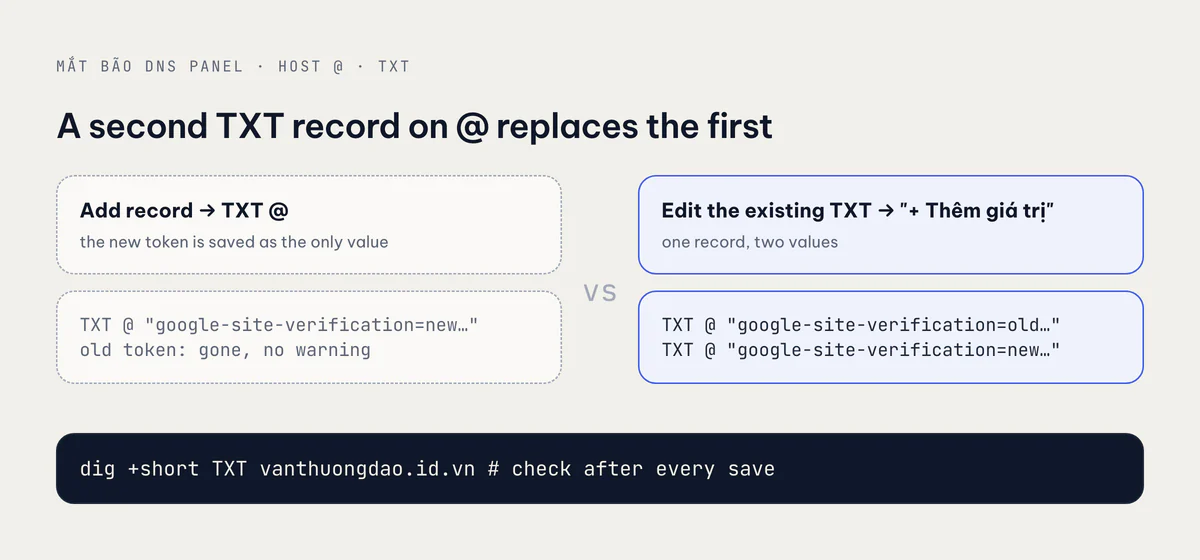
The personal domain was not new. Its zone already had a TXT on @: an older Google verification token from when I first set up the domain. I added a new record in the Mắt Bão DNS panel, chose TXT, host @, pasted the new token and saved. Then I looked at the zone again, and the old token was gone.
At Mắt Bão, creating a second TXT record on the same host replaces the existing one. It does not add a second record next to it, and it does not warn you. In DNS a name can have many TXT values, and most registrars let you add them as separate rows. This panel stores them as one record with several values, and "add" overwrites it.
The right way to keep both:
- Find the existing
TXTrecord on@and edit it. - Use "+ Thêm giá trị" (add value) to add the new token as a second value of the same record.
- Save, and check that both values are published.
# Every TXT value on the apex: both tokens should be listed
dig +short TXT vanthuongdao.id.vn
In my case the harm was limited. The old token belonged to an earlier verification, and I re-verified the domain under the account that now holds all eight properties. But a TXT on @ is also where an SPF record for email lives, and where other services put their own verification. Overwriting that kind of record breaks things that have nothing to do with Search Console, and nothing tells you. If your registrar's panel looks like this one, always run dig after you save.
Leave the Google record in place after verifying, too. Google checks it again from time to time, and a property whose record has gone away loses its verification.
Sitemaps: one per site, after the deploy is live
Each landing is a Next.js app with a sitemap.ts, served at /sitemap.xml. It lists every indexable page in both locales with their hreflang alternates. The portfolio's sitemap includes every blog post in English and Vietnamese, with image entries for covers. So every site gets its own sitemap, and the personal domain gets two, one for each host:
https://lockboxy.io.vn/sitemap.xml
https://minivid.io.vn/sitemap.xml
…
https://www.vanthuongdao.id.vn/sitemap.xml
https://apps.vanthuongdao.id.vn/sitemap.xml   # same domain property
The showcase sitemap goes into the vanthuongdao.id.vn property. A domain property accepts a sitemap from any of its subdomains.
The order matters more than it looks. Search Console tries to fetch a sitemap soon after you submit it. If the site on that domain is not live yet, because DNS is still propagating, the certificate has not been issued, or the deploy with the new SITE_URL has not finished, the first fetch fails, and the sitemap is marked "Couldn't fetch". It is not permanent, but you are now waiting on Google's retry instead of your own deploy.
There is a quiet way to get this wrong. The Minivid landing's Vercel project has no Git integration, so pushing to main does not deploy it. Production needs vercel --prod from the repo. If I had pushed the domain change and gone straight to Search Console, the sitemap would have been served by the old deploy, with URLs on the old host.
So before submitting, I check that the sitemap is live on the new domain and lists the new domain:
curl -sI https://minivid.io.vn/sitemap.xml | head -1   # HTTP/2 200
curl -s https://minivid.io.vn/sitemap.xml | grep -o '<loc>[^<]*' | head -3
A 200, and <loc> entries that start with https://minivid.io.vn. Then submit.
You don't need to request indexing for every page
After a new property is verified, it is tempting to open URL Inspection and press "Request indexing" on every page. For a site with a working sitemap, that is mostly wasted effort.
The quota for manual requests is small, roughly ten a day per property. More importantly, the sitemap already tells Google about every page, and internal links tell it which pages matter: each landing's home page links to its guides, FAQ and legal pages, and the showcase links to all seven landings. Those two signals are how Google finds and recrawls a site at a normal pace.
What I do use manual requests for:
- The home page of a site that just moved domains, so Google sees the new canonical host quickly.
- One or two key pages that changed in an important way, like a rewritten guide.
- Checking a fix. URL Inspection's live test shows what Google sees right now. That is the tool for a change like the
x-defaulthreflang fix on the Lockboxy landing, where the question is whether Google now reads the page the way you meant.
Everything else goes through the sitemap. If a page is not indexed after a few weeks, the problem is usually the page (thin content, a wrong canonical, a noindex), and requesting indexing again will not change that.
Takeaways
- Use domain properties when you control DNS. One TXT record covers the apex,
www, every subdomain and both protocols, so a subdomain likeapps.needs no property of its own. - At Mắt Bão, a new
TXTon@replaces the existing one. Edit the existing record and use "+ Thêm giá trị". Check withdig +short TXT <domain>after every change. - Keep the Google TXT record after verifying, and watch for SPF and other verifications sharing
@. - Submit each sitemap after the deploy is live on the new domain. Check for a
200and the right host in<loc>first, especially on a project that does not deploy on push. - A domain property accepts sitemaps from its subdomains, so submit the subdomain's sitemap there.
- Don't request indexing for every page. The sitemap and internal links do that job. Save the ~10 daily requests for home pages, key changes and checking fixes.
All eight sites start from apps.vanthuongdao.id.vn.
Related posts