On-device encryption in a React Native vault, with no password reset
How Lockboxy encrypts on the iPhone: an Argon2id key from the passcode, a wrapped data key, chunked AES-256-GCM, Keychain storage, backups and honest limits.

On this page
Lockboxy is a private vault for iPhone, built in React Native. The App Store description makes three promises: AES-256-GCM encryption on the device, a key derived from your passcode with Argon2id that is never stored, and no password reset. Each of those is a design decision with a cost, and this post walks through how they fit together in the code.
I'll keep this at the design level: what goes where and why, plus the limits I know about. It isn't a guide to attacking anything, and it isn't a claim that the app is unbreakable.
Who the encryption is for
The threat model in the repo starts from a plain question: if the photos never leave the phone, why encrypt them at all? The answer is that iOS file protection is designed for a locked or powered-off phone. A private vault mostly matters when the phone is already unlocked: a family member borrows it, it goes in for repair, or someone makes you open it. Past the lock screen, the app's files are exposed to device backups, file browsers and full-filesystem extraction tools.
So the in-scope adversary is someone who has the unlocked device, its backups, or a copy of its filesystem, but not the vault passcode. Out of scope, and written down as such: someone who knows the passcode, malware running with the app's own privileges while the vault is open, and screen capture while content is on screen.
The key hierarchy
There are three layers of keys, and only the bottom one ever touches content.
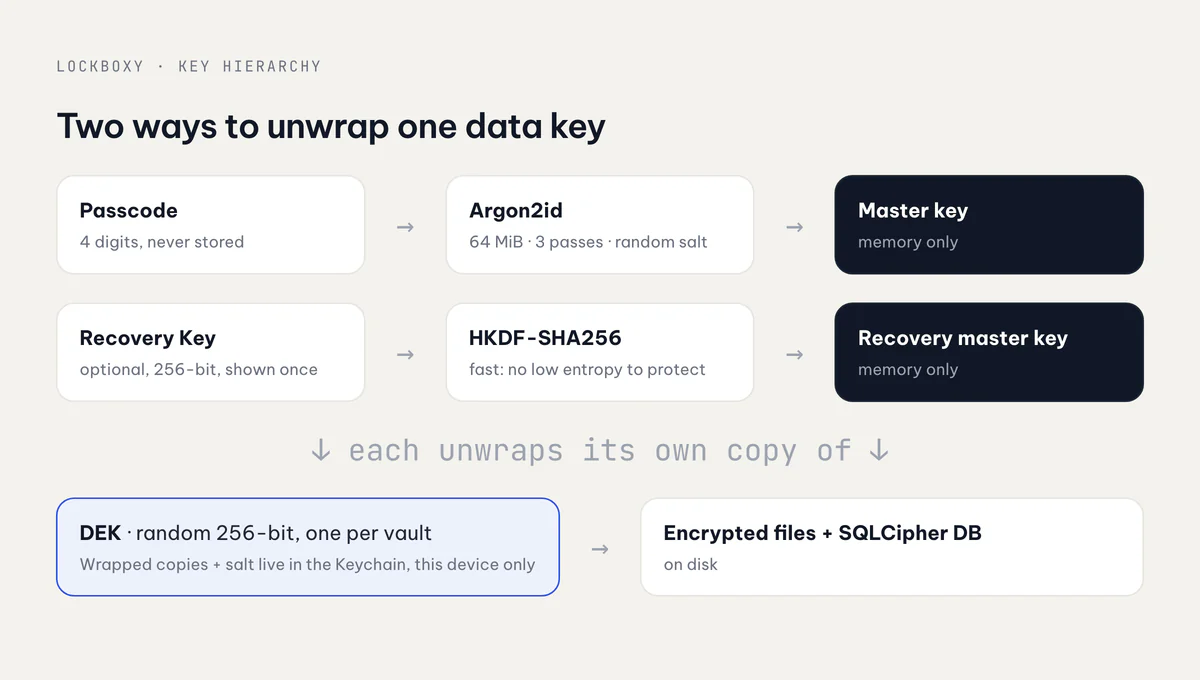
- Passcode → master key. The 4-digit passcode goes through Argon2id with a random 16-byte salt and produces a 32-byte master key. The master key is never stored. It's split with HKDF-SHA256 into subkeys with their own context labels, and then zeroed.
- Master key → DEK. Each vault has a random 256-bit data encryption key (DEK). The DEK is stored only in wrapped form, sealed with AES-256-GCM under a subkey from step 1. The additional authenticated data binds the wrap to its vault and its unlock path.
- DEK → content. Files are encrypted with the DEK. The SQLCipher database that holds the metadata uses a key derived from the DEK.
The Argon2id parameters for new vaults are constants in the crypto module:
export const ARGON2ID_PARAMS: KdfParams = Object.freeze({
  v: 1,
  m: 65536, // KiB, so 64 MiB of memory per guess
  t: 3,     // iterations
  p: 1,     // parallelism
});
An existing vault always reads its parameters back from storage and never from this constant, so the defaults can be raised later without locking anyone out. The code comment is also honest that these values are an estimate, not a benchmark.
The point of the DEK layer is that changing the passcode re-wraps one 32-byte key. It doesn't re-encrypt every photo. That layering also caught a real bug. The database key used to be derived from the master key, and the master key changes with the passcode. So a passcode change silently changed the key the database file needed, without ever re-keying the file. Deriving the database key from the DEK, which is stable, fixed it. A one-time migration moves older installs across.
Encrypting a file
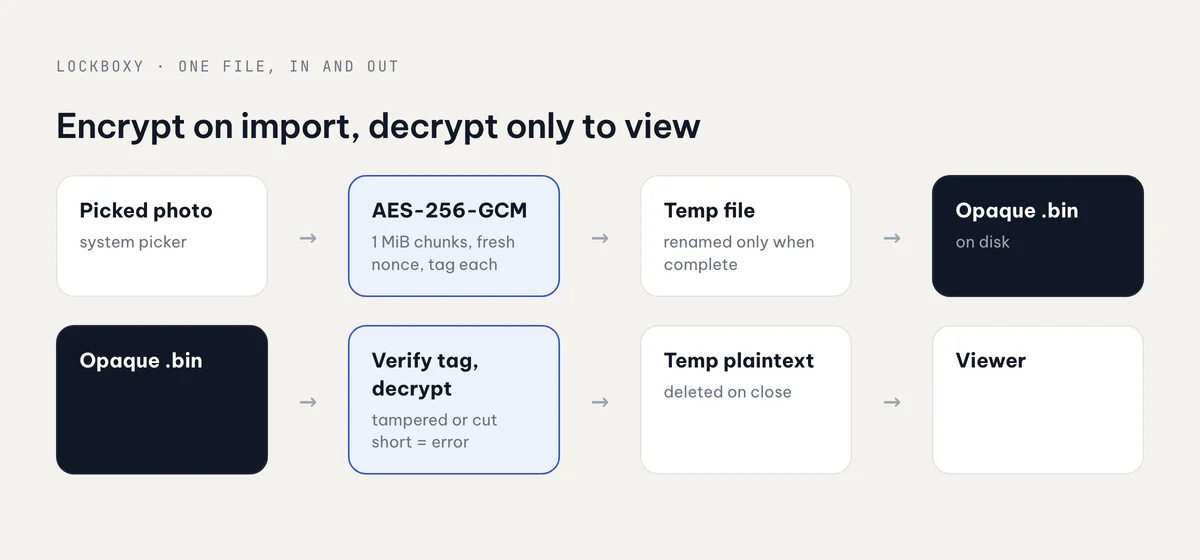
Content goes through react-native-quick-crypto as streamed AES-256-GCM in 1 MiB chunks. Every chunk gets its own nonce, made from a random per-file prefix plus the chunk index, and its own authentication tag. The item ID, the chunk index and a "this is the last chunk" flag are bound in as authenticated data. That means a chunk moved to another file, a reordered chunk, or a file cut short all fail to decrypt. None of them come back as quietly wrong data.
Two less obvious rules keep this safe:
- Write to a temp path, then rename. If an interrupted write were resumed, the same nonces could end up encrypting different data, and nonce reuse breaks GCM. So a partial blob is always thrown away and never continued.
- Plaintext only lives in a temporary viewing file, and that file is deleted on close, including on the error path.
Blob files on disk get opaque names with a .bin extension, so nothing in the container identifies itself as a photo or a video.
What lives where
| Place | What it holds |
|---|---|
| Keychain, one item per vault | salt, KDF parameters, wrapped DEK (and a separate wrapped copy for the Recovery Key) |
| App container | encrypted blobs, SQLCipher database |
| Memory, while unlocked | the DEK and derived keys, held privately inside the crypto service |
| Nowhere | the passcode and the master key |
The Keychain items use WHEN_UNLOCKED_THIS_DEVICE_ONLY and are never added to iCloud Keychain. Face ID unlock is a separate item gated by BIOMETRY_CURRENT_SET. On a successful scan it hands the passcode to the same unlock path as typing it, with the same throttle. Enrolling a new face or fingerprint invalidates that item, and so does any passcode change.
Backups
Because the Keychain items are this-device-only, an encrypted device backup restored to a new phone would bring the ciphertext but not the key record. So Lockboxy has its own backup file. It bundles the key record, the database file and every blob exactly as they are on disk. The DEK stays the same and nothing is re-encrypted. The file goes through the iOS share sheet to wherever the user chooses, whether that's iCloud Drive, Google Drive or AirDrop. There's no server of mine in between.
Restoring requires the original passcode or the Recovery Key. There's also a "Verify backup" check that proves a file decrypts without touching the live vault. A backup you have never tested is only a hope.
Why there is no password reset
A reset needs a second copy of the key somewhere: on a server, in an account, or behind a security question. Lockboxy has no account and no server, and the key is derived from a passcode it never stores. If I could reset your passcode, I could read your vault, and so could anyone who got hold of whatever made the reset possible.
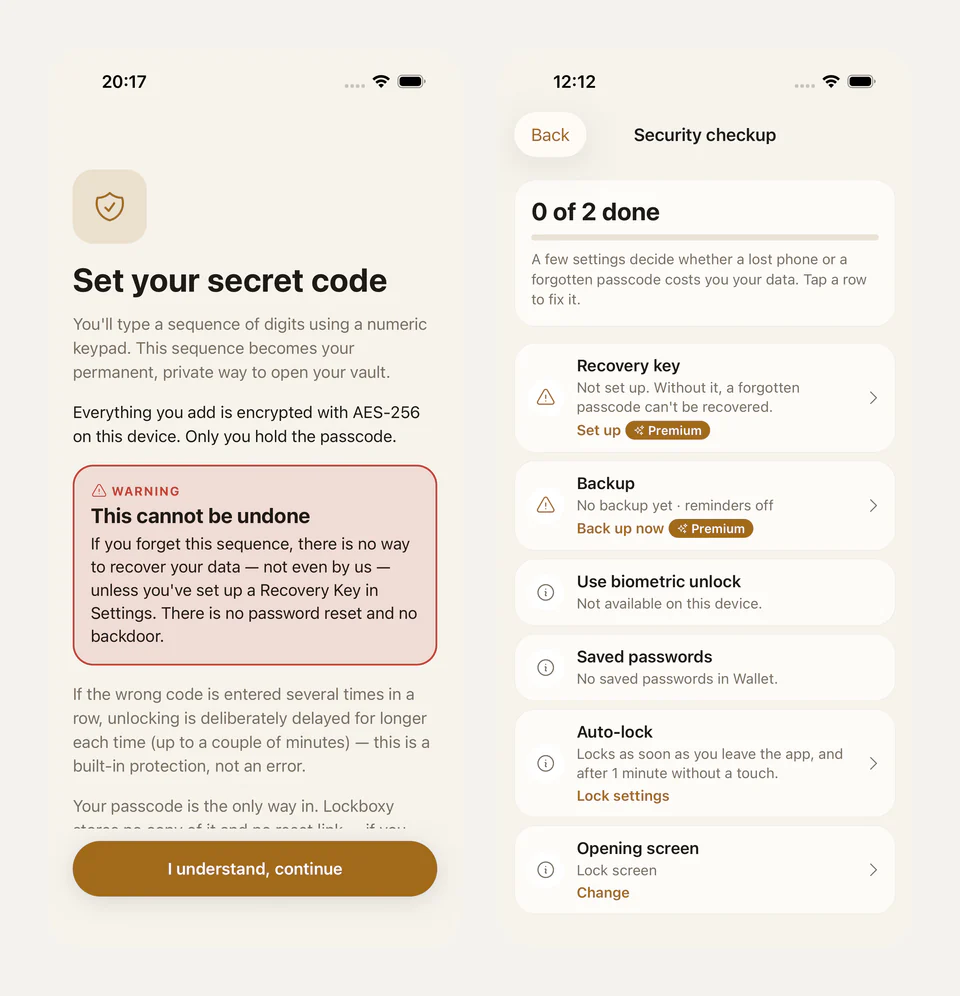
The setup screen says this before you choose a passcode. The only way back is the Recovery Key, and it's optional:
- It's a random 256-bit secret, shown once as 80 digits so it can be typed on a numeric pad.
- It wraps the same DEK independently, in its own Keychain slot.
- It goes through a fast HKDF rather than Argon2id. A random 256-bit secret has nothing guessable for Argon2id to slow down.
- Before the key is ever displayed, the whole pipeline is round-trip checked (encode, decode, derive, wrap, store, read back, unwrap, compare).
- Setting it up is a Premium feature, but using one never is, so a lapsed subscriber is never locked out.
Limits I'd rather state than hide
- A 4-digit passcode is a small space. Argon2id makes every guess cost memory and time, and the app adds growing delays after wrong attempts. But neither can make 10,000 combinations large. A copy of the key record or a backup file is only as strong as that passcode.
- The Keychain record isn't bound to biometry or the Secure Enclave. It's protected by the device-only Keychain class, and the code marks this as an open gap rather than a solved one.
- JavaScript strings can't be wiped. Key buffers are zeroed after use, but the passcode passes through an immutable string in the JS engine.
- Nothing helps once someone knows the passcode, or when malware runs inside the unlocked app.
There's one rule behind all of this: no hand-rolled primitives. Argon2id, AES-GCM, HKDF and SQLCipher all come from established libraries. My own work is in how they're put together, and that's where the bugs above were.
Takeaway
Store a wrapped key, not a derived one. Bind context into every AEAD call. Write atomically. Treat "no reset" as a promise you have to explain at setup. The App Store side of shipping this app is in Getting a private vault app through App Review, and my other apps are at apps.vanthuongdao.id.vn.
Related posts