An Update available prompt in seven apps, without a backend
How my seven iOS apps spot a newer App Store version with Apple's public lookup, once a day, without nagging, in ten languages and with no server of my own.

On this page
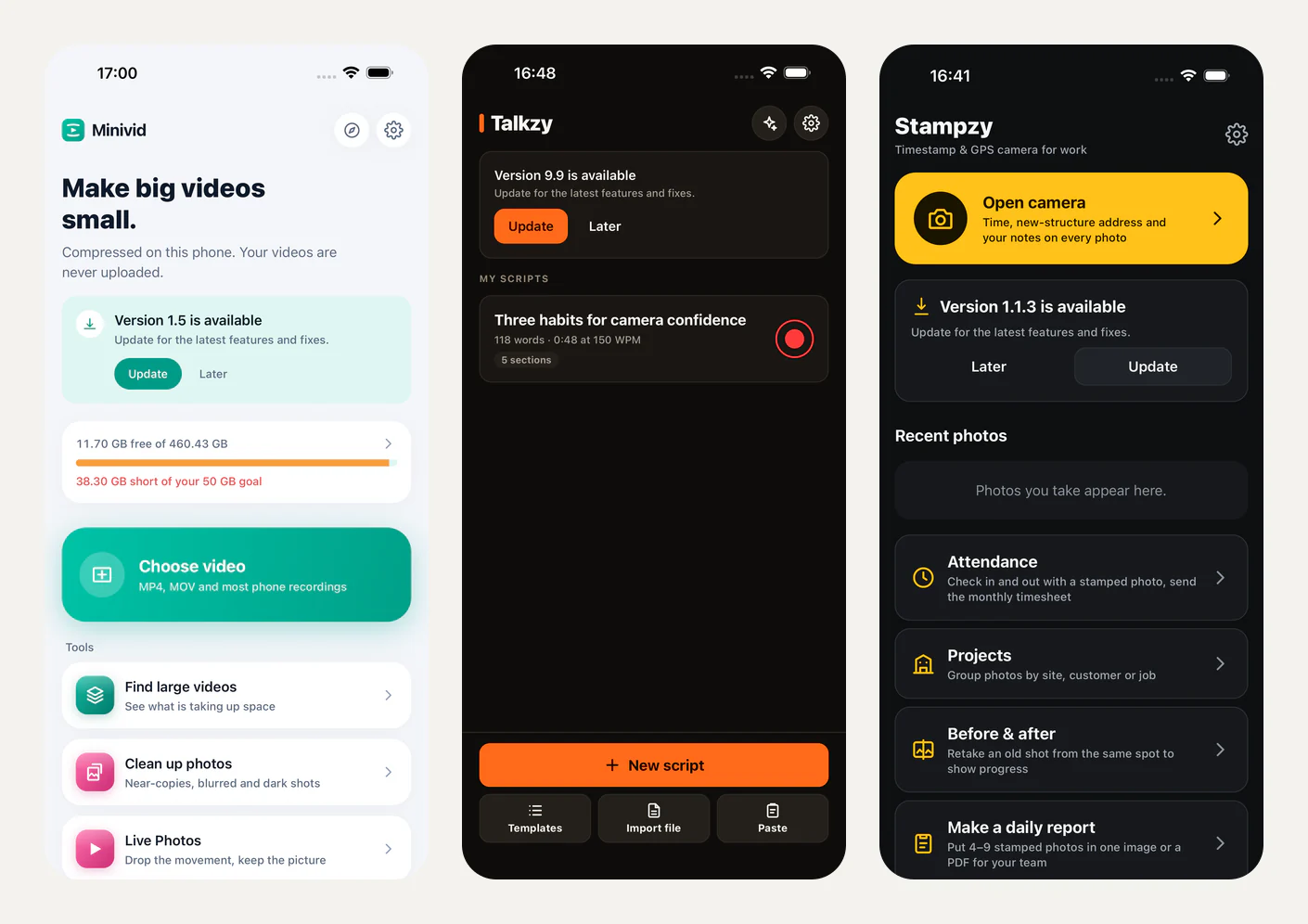
Not everyone has automatic updates turned on. When I ship a fix, some people keep running the old build for weeks, and then hit the bug I already fixed. Most of my apps have no server of my own, so I had no remote config to say "please update". What I wanted was a small card: "Version 1.6 is available. Update for the latest features and fixes", with Update and Later.
I built it first in Minivid, then put the same feature into the other six. Linkeeper's feature doc says it was "ported from Minivid's implementation (same pure module and tests)", and Baton's and Stampzy's docs end with "keep them alike". This post is how it works, and where the seven versions deliberately differ.
Apple already runs the backend
The App Store has a public lookup endpoint. Ask it about your app and it returns JSON with the current store version and the trackId. That is the whole "server":
GET https://itunes.apple.com/lookup?id=<store id>&country=<region>&t=<day number>Minivid, Linkeeper and Lockboxy ask by store id; Ringsy, Talkzy, Baton and Stampzy ask by bundle id (bundleId=). Either way, three details matter:
countryis the phone's region, so the answer comes from the storefront the person actually buys from. If that storefront has no result, the code retries once withoutcountryand gets the default store.tis the day number (Math.floor(now / DAY_MS)). Apple's CDN can keep serving the old version for hours after a release; a value that changes daily means a stale copy can't hide a release for long.- Nothing else. Only the store id or bundle id and the region reach Apple. No identifier, nothing about videos, scripts or vault contents.
Parsing is defensive. parseLookup takes the first result and returns null unless version is a string, trackId is a number, and the version is a plain dotted number. A missing app, an empty results array or unexpected JSON all mean "no update".
How often it checks
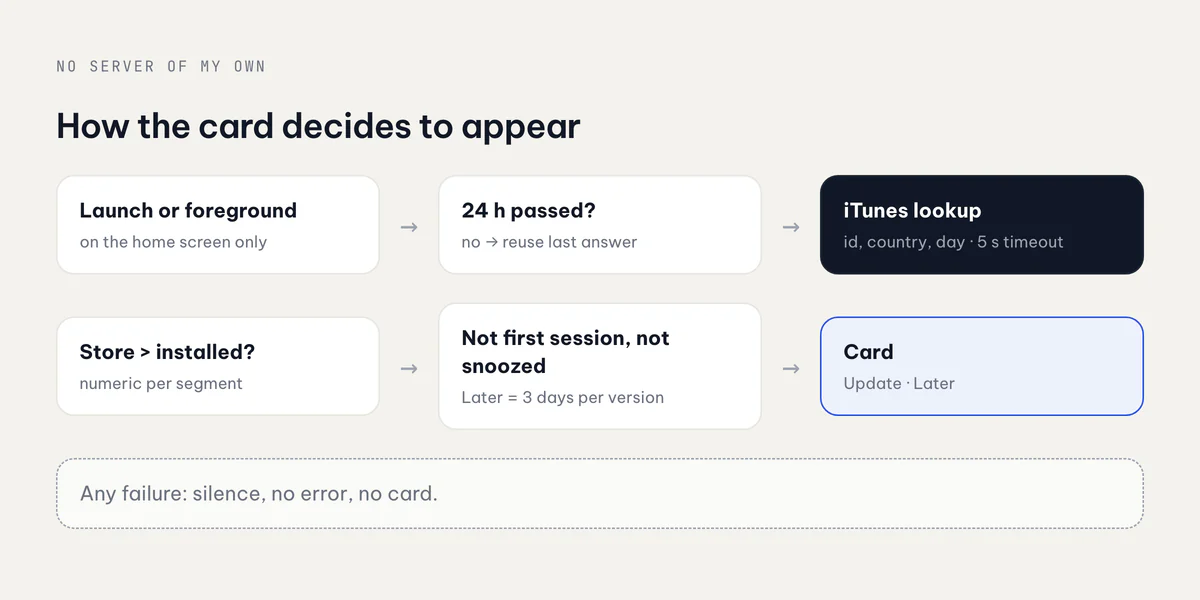
The card checks when its screen mounts and every time the app comes back to the foreground (AppState turning active). The store throttles that to at most one lookup per 24 hours (CHECK_INTERVAL_MS). The code comment explains why: "Apple's CDN caches the answer for about that long anyway."
Every lookup is fire-and-forget with a 5 second timeout through an AbortController. The comment at the top of Minivid's module sets the bar: "any failure is silence: this must never slow a launch or show an error." Offline, a timeout, a 500 or bad JSON: no card, no toast, nothing in the way.
Comparing versions without lying
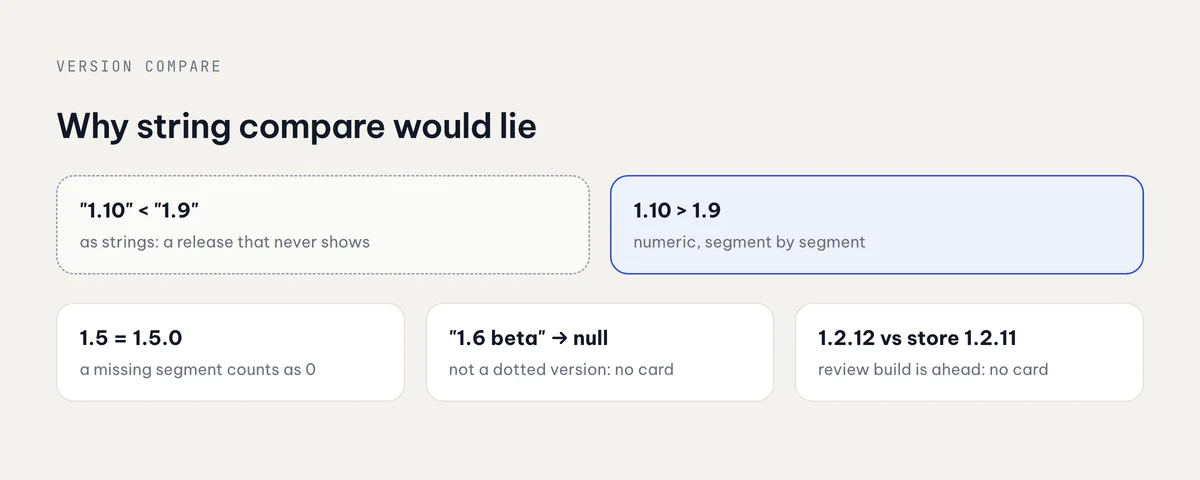
The easy bug here is comparing version strings. As strings, "1.10" sorts before "1.9", so a person on 1.9 would never be told about 1.10. Every app uses the same numeric compare:
export function compareVersions(a: string, b: string): number | null {
  const parse = (v: string) =>
    /^\d+(\.\d+)*$/.test(v.trim()) ? v.trim().split('.').map(Number) : null;
  const left = parse(a);
  const right = parse(b);
  if (!left || !right) return null; // not a dotted version: no card
  for (let i = 0; i < Math.max(left.length, right.length); i++) {
    const diff = (left[i] ?? 0) - (right[i] ?? 0);
    if (diff !== 0) return diff > 0 ? 1 : -1;
  }
  return 0;
}
A missing segment counts as zero, so 1.5 equals 1.5.0. Anything that isn't digits and dots returns null, which callers treat as "no update". The card only shows when the store is strictly newer. That also covers the build App Review and TestFlight testers run: it is newer than what the store sells, so the compare says "no".
The other half of the compare is the installed version, and that is where a quiet bug could hide. If the constant in JavaScript drifts from Xcode's MARKETING_VERSION, people on the newest build get told to update. Two fixes, depending on the app:
- Minivid, Linkeeper, Ringsy and Talkzy keep an
APP_VERSIONconstant, and a unit test fails if it doesn't equal everyMARKETING_VERSIONin the Xcode project. Lockboxy does the same with itspackage.jsonversion. - Baton and Stampzy skip the constant and read
CFBundleShortVersionStringfrom their native module, with a doc note: "neverAPP_VERSIONinsrc/constants.ts, which can drift."
Not nagging
A prompt that appears too often gets ignored, or worse, gets the app deleted. The rules that keep it gentle are the same in all seven:
- Never in the first session after install. The person just came from the store; there is nothing to nudge about. Minivid, Linkeeper and Lockboxy record
firstSeenAton the first check and compare it with when this JS runtime started. Ringsy and Talkzy keep alaunchedBeforeflag. Baton and Stampzy use "not yet onboarded when this session started". - Later means three days, for that version.
SNOOZE_MSis three days and is tied to the store version that was snoozed. If an even newer version lands, the card shows again at once. - A card, never a sheet or a gate. It lives on one screen only, which by construction keeps it off onboarding, the paywall and anything in progress.
- It waits its turn. Ringsy hides it while the first-run coach mark or What's New is up; Talkzy also while a rescued take is shown; Linkeeper while you're searching or selecting; Baton in expecting mode, when the contraction screen replaces Today.
Each card also follows its app's design rules. On Stampzy's Home the yellow belongs to "Open camera", so Update is a secondary button and Later a ghost one; a later Talkzy commit made Update secondary for the same reason: one primary button per screen.
Where the seven differ
The pure module is shared; the edges are not.
| App | Card lives on | Installed version | Notes |
|---|---|---|---|
| Minivid | Home | APP_VERSION + test | Update opens the in-app App Store sheet first |
| Linkeeper | top of Library | APP_VERSION + test | hidden while searching or selecting |
| Lockboxy | main vault Home, after unlock | package.json + test | the lookup itself only runs after unlock |
| Ringsy | Home | APP_VERSION + test | concurrent checks share one in-flight request |
| Talkzy | script library | APP_VERSION + test | waits for coach mark and What's New |
| Baton | Today | native CFBundleShortVersionString | no analytics at all |
| Stampzy | Home, under Open camera | native CFBundleShortVersionString | secondary Update button |
Lockboxy has the strictest rules. The card is allowed in exactly one place, the main vault's Home after unlock, and a test fails if any other file imports it. It never appears on the lock screen or the optional opening screen, the lookup only runs once the vault is open, and while it's up, the other Home tips wait so two cards don't compete for the same tap.
One difference worth knowing: what happens when a lookup comes back empty. Minivid, Linkeeper and Lockboxy keep the last good answer, so a flaky network never hides a real update. Ringsy and Talkzy clear the cached release when the lookup returns nothing, which errs toward hiding the card. The two behaviours should probably be made to match.
Opening the store differs too. Most apps try itms-apps://apps.apple.com/app/id<trackId> and fall back to the https URL. Minivid first tries the in-app App Store sheet, whose button already reads Update. Minivid, Linkeeper and Lockboxy switch the card off on Android explicitly: the lookup is Apple's, and there is no App Store listing to compare with.
Ten languages, three events, and how I test it
The strings are four keys (title, body, update, later) in all ten catalogs, with the version as a {{version}} placeholder, so the parity test catches a translation that drops it. In Vietnamese the card reads "Đã có phiên bản {{version}}", with "Cập nhật" and "Để sau".
Analytics are three events with no parameters at all: update_prompt_shown (once per store version per session), update_prompt_tapped, update_prompt_dismissed. No version, no region. Baton sends none, because its rules forbid analytics entirely.
Testing a feature that depends on a future App Store release needs a seam. Each app reads a debug-only launch argument: Minivid's -MinividUpdateInstalledVersion 0.0.1 pretends an old build is running against the live listing, while Ringsy's and Talkzy's -…UpdatePreview 9.9 pretend the store has 9.9 with no network at all. The seam also skips the daily throttle and the first-session rule. Maestro flows in English and Vietnamese use it to take the screenshots above. Release builds never read it.
Takeaways
- You may not need a backend for this. Apple's lookup, a daily throttle and a cache-buster are enough.
- Compare versions as numbers, and test where the installed version comes from. That second test is the one that stops you nagging people already on the latest build.
- Gentle beats loud. No first session, a per-version snooze, one screen, silence on failure.
- Port the pure module, decide the edges per app. Placement, styling and privacy rules belong to each app; the maths doesn't.
The same lookup also feeds my app showcase. For the rest of the setup these apps share, see shipping seven iOS apps solo.
Related posts