The App Store Connect first-IAP trap: pulling a submission
Removing a submission that carries an app's first in-app purchase can leave a phantom Ready for Review state and 500 errors. The order that works, step by step.
On this page
On 30 September I submitted Linkeeper 1.2.0 together with Linkeeper Unlimited, the app's first in-app purchase. Within a day I had pulled that submission out of review twice to put a newer build in its place. The second time, App Store Connect started answering with HTTP 500 errors, and the purchase sat in a "Ready for Review" state that did not belong to any submission I could see.
Nothing was lost in the end. The 500s stopped after about half an hour, the purchase reset itself, and the version and the purchase went in together. But that half hour is easy to make worse by clicking around, and the rules that cause it are not obvious until you hit them. This post is the order I now follow, collected from Linkeeper, from Lockboxy's first subscription launch, and written down for the next app with a subscription group.
Why a first in-app purchase is different
Once an app has an approved in-app purchase, a new version is a one-item submission: the version and its build. Lockboxy's later updates go in exactly like that, because its subscription group and products are already live.
The first purchase is different. App Store Connect says it on the subscriptions page itself: the first in-app purchase must be submitted with a new app version. You pick it under "In-App Purchases and Subscriptions" on the version page, and it is reviewed with that build. Linkeeper's billing checklist has the same line: attach the purchase to the version that turns billing on.
The trap is that "submitted with a version" is a property of one submission. If that submission is removed from review, the version and the purchase both drop out, and the purchase does not quietly follow the version into the next one.
What happened with Linkeeper
The sequence, from the release notes in the repo:
| When | What |
|---|---|
| 30 Sep | 1.2.0 (build 5) submitted with Linkeeper Unlimited, its review screenshot and the App Privacy update |
| 30 Sep | Pulled from the queue (it shows as Developer Rejected). The same version record renamed to 1.3.0 with build 7, the purchase resubmitted with it |
| 1 Oct | Build 7 pulled and replaced by build 8, which added opt-in rewarded ads |
| 1 Oct | Adding the version to a draft returned 500s for about 30 minutes, and the purchase showed a phantom "Ready for Review" |
| 1 Oct | Both cleared on their own; version and purchase submitted together |
What I did during that half hour is where it went wrong. With an empty draft submission open, I pressed "Add for Review" on the purchase's own page. That put it into "Ready for Review" without a version beside it. Deleting the draft did not undo that: the purchase stayed in that state with its "Add for Review" button disabled, so there was nothing left to click. Around 30 minutes later it went back to "Prepare for Submission" by itself, and the normal flow worked.
I also tried to submit the purchase through the App Store Connect API instead of the UI. For a first non-consumable that is refused: it has to ship with a version, and the API endpoint for in-app purchase submissions would not take it on its own. The UI path on the purchase page was the only way in.
The order that works
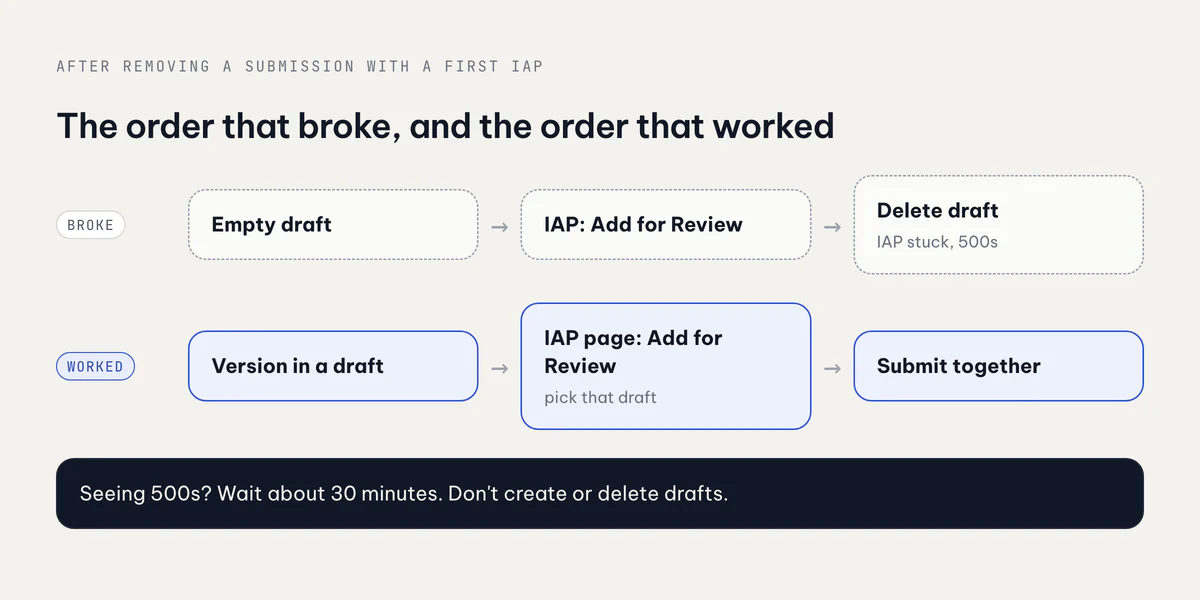
- Put the version in a draft first. On the version page, with the new build attached, choose Add for Review so a draft submission exists that already holds the version.
- Then go to the purchase's page and press Add for Review there. App Store Connect asks which draft to use; choose the one holding the version.
- Check the item count on the draft, then Submit.
If step 1 answers with a 500, stop. Don't create a second draft, don't add the purchase to an empty one, and don't delete a draft that already holds the purchase. In my case nothing I clicked during the error window helped, and one of those clicks is what left the purchase stuck. Waiting about 30 minutes and retrying the same step did.
Subscription groups add one more rule
Linkeeper's purchase is a single non-consumable. Lockboxy launched with a subscription group (monthly and yearly) plus a lifetime purchase, and that taught me the second half of this.
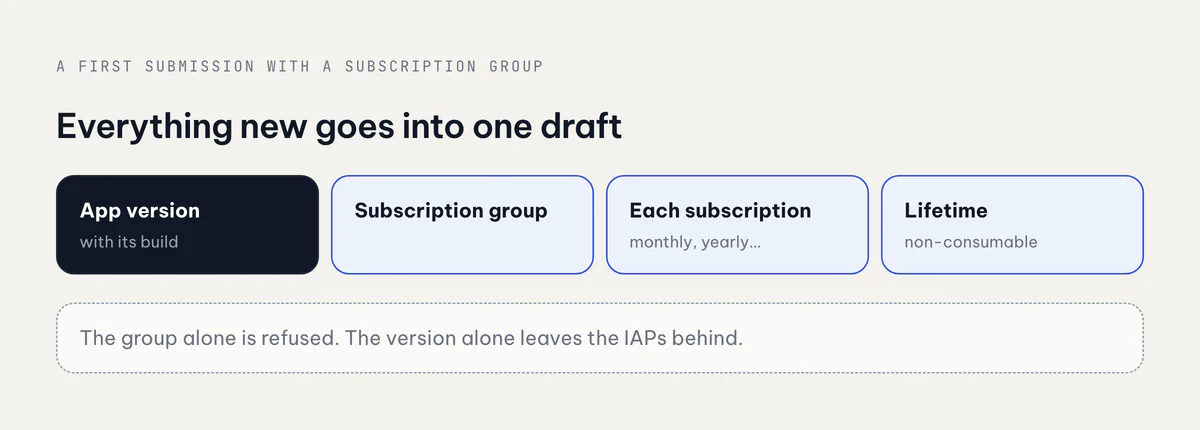
Lockboxy's first submission was rejected for a missing Terms of Use link (guideline 3.1.2(c)), and the three purchases were rejected along with it. I fixed the description and resubmitted with a newer build, but that resubmission held only one item: the version. The purchases stayed in Developer Rejected and would not have been reviewed. After cancelling that submission, trying to add the subscription group for review on its own failed with two messages: new subscription groups must be submitted with an auto-renewable subscription from within that group, and an app version has to be added for the platform.
The fix was one draft with everything new in it: the version, the subscription group, each subscription, and the lifetime purchase. Five items, one Submit.
This is the shape that matters most for Baton, my baby tracker (baton.io.vn). Its Plus tier is a yearly subscription in a group, with a free trial, plus a lifetime unlock. The paywall side of that is in RevenueCat paywall patterns; the submission side is this checklist.
Swapping a build that is in review
Sometimes the build in review has to change: Lockboxy once had a build in the queue that lacked a fix I needed, and Linkeeper's build 8 added a feature I wanted in the same release. App Store Connect does not let you change the build of a submitted version in place, so the swap always goes through removing it from review.
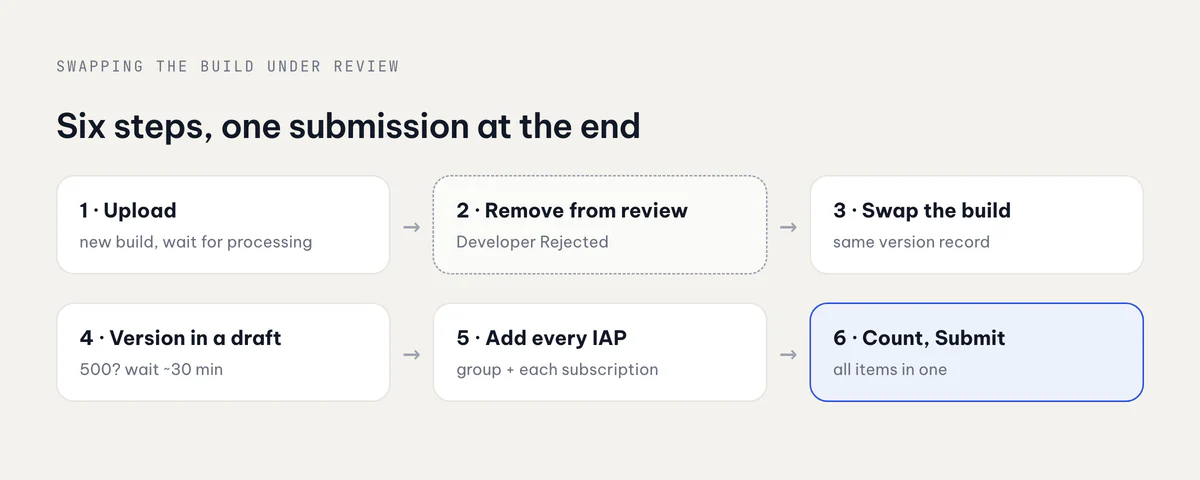
- Upload the new build and wait until it has finished processing. Do this before you pull anything, so the version is out of the queue for as short a time as possible.
- Remove the version from review. It drops to Developer Rejected, and so do the first purchases that were submitted with it.
- Swap the build on the same version record. Linkeeper kept its record and only renamed it from 1.2.0 to 1.3.0; there is no need for a new one.
- Add the version to a draft. If this returns a 500, wait instead of improvising.
- Add every first purchase to that draft from its own page: the non-consumable, and for a subscription app the group plus each subscription in it.
- Count the items, then Submit. A first launch with a group, two subscriptions and a lifetime purchase is five items. One item means the purchases were left behind.
The cost is the queue position. Removing a version from review restarts its wait from zero, which is why I only do it when the build in the queue would ship something I would not want users to have.
Takeaways
- A first in-app purchase lives inside one submission. Remove that submission and you are rebuilding it, version and purchases together.
- Version first, purchase second, same draft. Never Add for Review on a purchase while the only draft is empty.
- A subscription group never goes alone. It needs at least one of its subscriptions and an app version in the same draft.
- Count the items before you press Submit. It is the cheapest check against the purchases being left in Developer Rejected.
- On a 500, wait. In my case it cleared by itself in about 30 minutes; extra drafts and deletions only added a stuck purchase on top.
Linkeeper is at linkeeper.io.vn, Lockboxy at lockboxy.io.vn, and all seven apps are on apps.vanthuongdao.id.vn. The previous App Store post is about a different kind of rejection: a price in a screenshot under guideline 2.3.7.
Related posts