Saving never waits on the LLM: async AI tagging and an MV3 extension
A one-click save for creators: a BullMQ worker that tags in the background with retries, and a Manifest V3 extension with page adapters and an offline queue.

On this page
Wavesgroup CIP is a content-research tool for creators. You see a video, a post or an article worth keeping, you click once, and it lands in your library already tagged. I built it solo: a browser extension, a web app and an API.
The whole product depends on that click feeling instant. The tagging, though, is done by an LLM that typically takes seconds and occasionally fails or returns something odd. Put those two facts in the same request and the click inherits every slow and failed LLM call. So the first rule written into the architecture was: the save never waits on the model. It commits, returns, and the tagging happens afterwards, somewhere it's allowed to be slow, fail, and try again.
This post covers how that split works, what broke inside it, and the browser-extension side, where Manifest V3 has its own ideas about when your code gets to run.
The save path: commit first, enqueue second
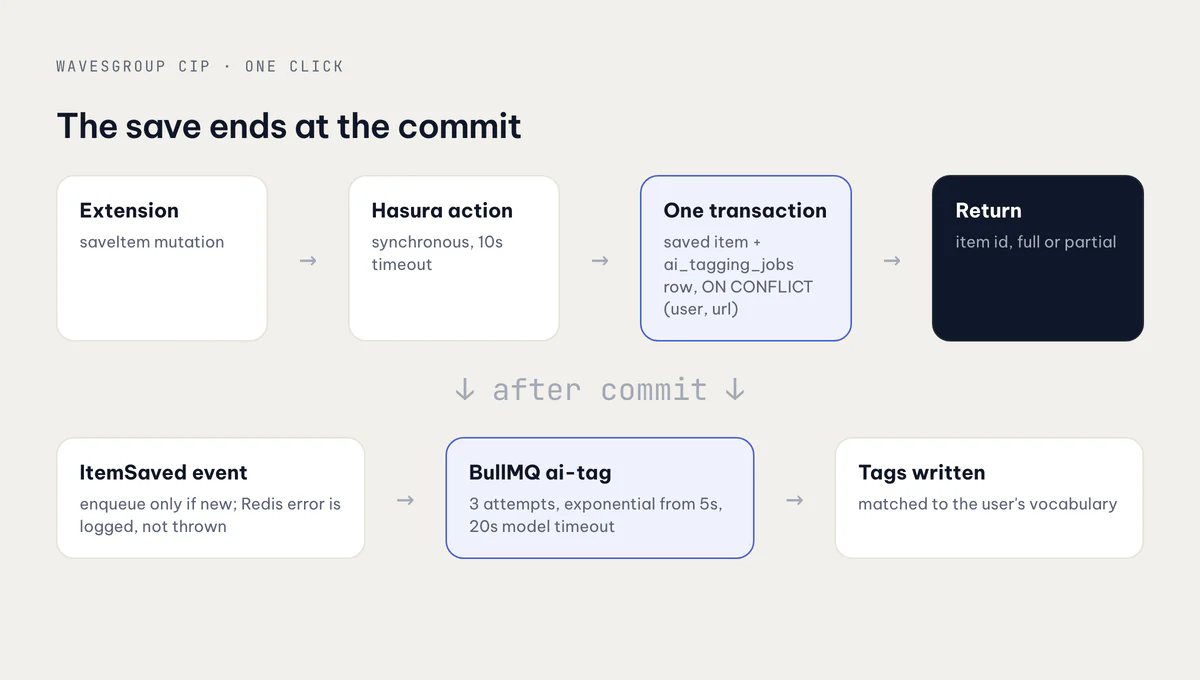
The extension calls a saveItem mutation. Hasura routes it as a synchronous action, with a 10-second timeout, to a NestJS command handler. The handler does three things in a strict order:
- Validate first. The captured page is checked before anything is written, so an invalid capture leaves no side effects at all.
- One transaction. It inserts the saved item and a row in
ai_tagging_jobstogether. Saving the same page twice doesn't create a duplicate: a partial unique index on(user_id, url)for live pages makes the insert anON CONFLICTthat returns the existing row. - Publish after commit. Only once the transaction has committed does it publish an
ItemSavedevent. The code comment explains why: a fast worker must never see a queued item id before the row is durably committed.
The event handler is the only place that touches the queue:
@EventsHandler(ItemSavedEvent)
class EnqueueAiTagging {
  async handle({ itemId, isNewInsert }: ItemSavedEvent) {
    if (!isNewInsert) return;              // a re-save doesn't re-tag
    try {
      await this.queue.add('ai-tag', { itemId });
    } catch (err) {
      this.log.error('enqueue failed', err); // never fails the save
    }
  }
}
If Redis is down, the save still succeeds. The tagging job row exists with status PENDING, and the user can retry it later. That's the trade-off the architecture decision record accepted when it chose BullMQ over Hasura event triggers: it matched the team's convention and gave more control, and the cost is that Redis becomes a hard dependency. Keeping the state in a Postgres table, not in the queue, is what makes that cost bearable. The queue moves work, and the table says where that work is.
The worker
The ai-tag queue runs with three attempts, exponential backoff starting at 5 seconds, the last 100 completed and 500 failed jobs kept for inspection, and a 20-second timeout on the model call. Each job runs a six-step pipeline:
- Load the item.
- Load the user's existing tag vocabulary.
- Ask the model for tags.
- Normalise them deterministically.
- Match each one against the user's tags: exact match on a normalised key first, then
pg_trgmsimilarity of at least 0.75, and only then create a new tag. - Write them, skipping any tag the user has previously removed from that item.
Step 5 is what keeps a library usable. Without it, "UI design", "ui-design" and "Thiết kế UI" become three tags.
Step 6 came from a bug. Retrying a job brought back tags the user had deliberately deleted, because the worker had no memory of the deletion. It now checks the audit log for tags removed from the item and leaves them out.
Idempotency lives in the database, not in BullMQ job ids. ai_tagging_jobs.item_id is unique, so there is one job row per item, and the item-tag link has a composite primary key with ON CONFLICT DO NOTHING. A job that runs twice writes the same tags once.
Status that tells the truth
The job row moves through PENDING, PROCESSING, SUCCEEDED and FAILED. The subtle part is when to write FAILED:
} catch (err) {
  const final = job.attemptsMade + 1 >= (job.opts.attempts ?? 1);
  await this.jobs.update(itemId, {
    status: final ? 'FAILED' : 'PENDING',
    lastError: String(err).slice(0, 1000),
    attemptCount: () => 'attempt_count + 1',
  });
  throw err; // let BullMQ schedule the retry
}
Writing FAILED on the first error would show the user a retry button for work that's still in flight. So only the last attempt marks the job failed. The manual retry action checks ownership, refuses anything that isn't FAILED, resets it to PENDING and enqueues it again.
When the model's answer isn't what you asked for
The architecture document planned for a typed generateObject call with a Zod schema. What shipped instead calls an internal workflow runner that another team already operates, which settled the provider question by reusing what was there. The cost is that the response shape is whatever the workflow returns, and in practice it returned four different shapes: objects with tag, objects with label, a bare array, and an array of plain strings next to a separate confidence array.
The first parser only understood one of them. Three of six test probes came back as plain strings, and those produced zero tags, silently. The job succeeded with nothing to show for it. The parser now reads all four shapes, and follows a rule that matters more than any single shape:
- An unreadable response throws. A response like
{}is retried. It is never recorded as an empty success. - A readable but empty list is a valid result. Some pages really have nothing to tag.
- More than five tags are trimmed to five, and a missing confidence becomes a floor of 0.45.
The difference between "the model said nothing" and "I couldn't understand the model" is the whole point. Collapsing them into one empty array is how you ship a feature that looks like it works.
Two more lessons from the same area. For a while the queue was producer-only: the API enqueued jobs and no worker consumed them, so every job sat at PENDING. And a missing TypeORM entity registration once made the worker fail all three attempts on every job. Both looked like "AI tagging is slow" from the outside. A status column you can query is what turned them into bugs you can find.
The extension: Manifest V3 on its own schedule
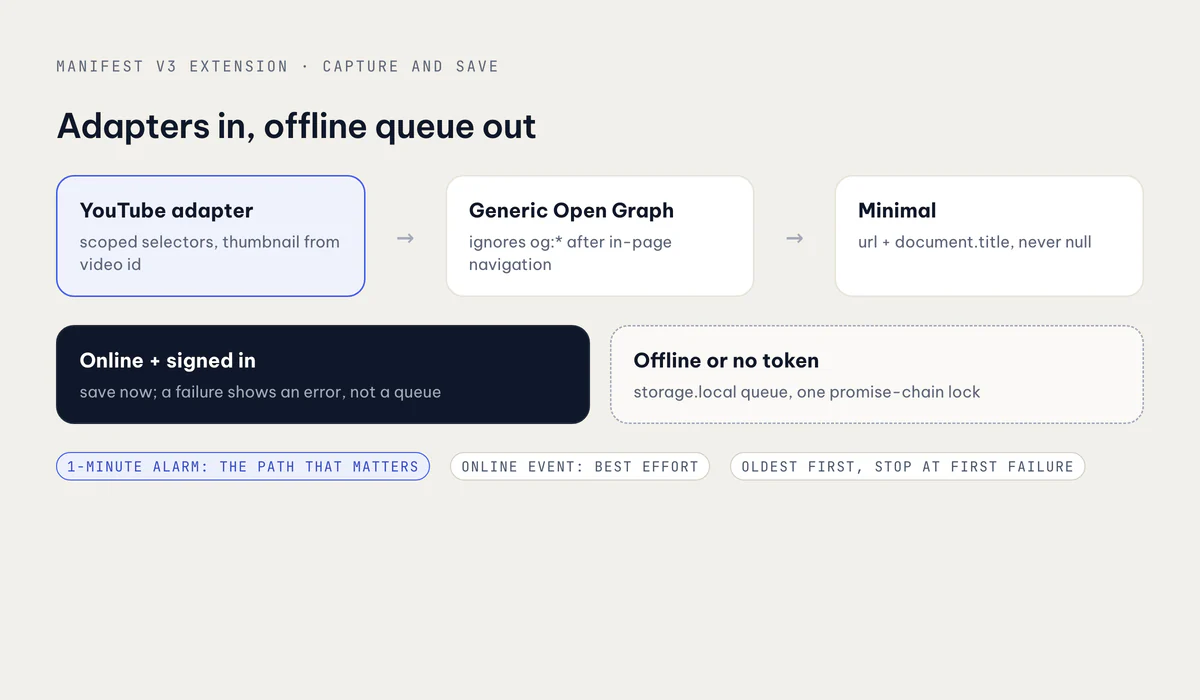
The extension is built with WXT on Manifest V3. A save can start from the toolbar icon, Ctrl/Cmd+Shift+S, the context menu or the popup.
Adapters, and pages that lie about themselves
Capture goes through a fallback chain: a platform adapter, then a generic Open Graph adapter, then a minimal record of the URL and document title. The URL is never null, so a save always produces something. YouTube watch pages have a dedicated adapter with scoped selectors. Other pages go through the generic adapter, and a hostname table labels them as one of seven platforms (YouTube, TikTok, Reddit, Pinterest, Facebook, Instagram, LinkedIn) or plain web. For Facebook, Instagram and LinkedIn, where metadata is thin, the background also takes a screenshot with captureVisibleTab. It has to do that early, while it's still inside the user-gesture window.
The nastiest capture bug wasn't platform-specific. Save a second video after clicking through to it in the same tab, and you got the new URL with the first video's title and thumbnail. location.href is kept current by the History API, but og:title and og:image are server-rendered into the first HTML and no SPA router rewrites them. The fix detects in-page navigation directly:
function hasNavigatedSinceLoad(): boolean {
  const [nav] = performance.getEntriesByType('navigation') as PerformanceNavigationTiming[];
  return !!nav && nav.name !== location.href;
}
If the page has navigated since it loaded, the generic adapter ignores og:* and falls back to document.title, which routers do keep current. The YouTube adapter stopped reading og:* at all and derives the thumbnail from the video id in the live URL, so the two can't disagree again.
The offline queue
If there's no token or the browser is offline, the capture goes into a queue in browser.storage.local. Three details made it reliable:
- A lock around every read-modify-write. Two rapid saves in different tabs, or an enqueue racing a flush, would both read the same queue and one write would clobber the other. A review test reproduced a lost item in 48 of 50 runs. Every queue operation now goes through one promise-chain lock.
- Flush oldest-first, persist after each success, stop at the first failure. A crash mid-flush loses nothing, and at worst resends the one item that was in flight.
- An alarm, not just the
onlineevent. In MV3 the service worker gets terminated when idle, and anonlineevent doesn't wake it. A one-minutechrome.alarmstimer is the path the flush actually depends on. Theonlinelistener, a flush message and an opportunistic flush before each live save are extras.
There's no client-side dedupe. The server's ON CONFLICT on (user, url) already handles it. And a save that fails while online and signed in is not queued. It shows an error, because queueing it would hide a real problem behind a "saved" toast.
Two smaller MV3 lessons: context menus persist across service worker restarts, so the code calls removeAll() before create() instead of registering the same ids again on every restart. And the scripting permission was dropped after a Chrome Web Store rejection; the permission list now stops at what the features use.
Sign-in
Auth is Keycloak SSO through launchWebAuthFlow with PKCE. Keycloak rotates refresh tokens, so two concurrent refreshes would invalidate each other. Refresh runs 15 seconds before expiry under a serialising lock. A key in the manifest pins the extension id, so the redirect URI stays stable across builds.
What I'd do again
- Commit, then publish, then enqueue. A worker should never see an id the database hasn't committed.
- Keep job state in a table, not in the queue. It's what makes a Redis outage, a missing consumer or a silent failure visible.
- Make a failed enqueue non-fatal. The save is the product; the tagging can be retried.
- Mark
FAILEDonly on the last attempt, and make retry refuse anything else. - Put idempotency in unique constraints. Retries then cost nothing.
- Parse model output permissively, but throw on unreadable. An empty result and an unparsed one are different things.
- Remember what the user removed, or retries will undo their work.
- In MV3, rely on alarms, lock storage read-modify-writes, and don't trust
og:*after in-page navigation.
The rest of the platform, including the YouTube research tools and Smart Space collections, is in the Wavesgroup CIP case study.
Related posts